Home
Operations & Process Improvement Fractional Technology Leadership AI Discovery Days Custom Development Consulting
Talkora Docora Conveyor Watchtower ResortSteward
About Insights Partners Contact

Watchtower

Silence is never health.

Monitoring for a fleet of Laravel apps and the servers they run on. Watchtower looks inside each app at the queue, Horizon, every scheduled command, failed jobs and errors, and at each server for security updates, reboots and backups. Those are the things a busy sys admin with a lot of systems misses.

Why Apps Fail Quietly

With enough servers and apps, something always slips past the person looking after them.

The health check lives on the same server as the app. When the server goes down, the check goes with it, and nobody hears either of them stop.

The backup script can't tell you it didn't run. If cron stops or the machine is off, the silence looks exactly like success.

Exceptions pile up in the log, a nightly command fails, a queue worker stops. Whoever looks after the servers has no time to read every log on every box, so the first report often comes from a customer.

Where alerts exist, one outage sends a message for every check it breaks, and people learn to skim past them.

Security updates sit on a server nobody has logged into this month, and the reboot one of them asked for is still waiting weeks later.

A disk fills a little every day, and nobody notices until the night it's full.

Inside Every Laravel App

An uptime check only tells you the server answered. A Laravel app can answer every request while exceptions fill its log, its queue worker is dead, and a nightly command has failed all week. The archint/health package reports on every part that has to be running.

Database and cache. Every poll runs a real query and a cache write and read, and reports how long each took.

Queue workers. A heartbeat job goes through the queue every minute, so Watchtower knows a worker is actually picking jobs up. It works with Horizon or a plain queue:work.

Horizon. Each master and its supervisors. A paused or idle supervisor shows up as degraded, a missing master as failing.

The scheduler. Every named scheduled command with its cron expression, last success, last failure and run time. A command that is late, failing, or scheduled but never once finished is caught.

Failed jobs. How many are waiting in the failed-job store, and how old the newest one is.

What lands in the log. Every exception the app reports, the same ones that end up in laravel.log, counted and broken down by exception class and the place in your own code it came from. You hear about them without anyone reading the log. The messages themselves never leave the app.

Outgoing mail. Emails the app could not hand to its mail provider are counted, so a broken mail setup doesn't wait for someone to notice a missing email.

Dependencies. A Composer and npm audit of the lock files actually deployed on the server, re-run whenever they change and at least once a day. Packages that ship to the browser are kept apart from build tools, which never alert.

Release and identity. The commit that is running and when its config was cached, plus a check that the app answering is the one, and the environment, that was expected.

Your own numbers. One line in your code turns anything worth counting into a check, such as webhook failures or bounced emails, with thresholds set in Watchtower like everything else.

Installing the package takes a composer require and three settings, with the app's scheduler and a queue worker running. The report sits behind a key, and anyone without it gets a 404, as if the address didn't exist. Plain websites get the outside checks only.

The Jobs That Slip

When one person looks after a lot of machines, the routine work is what gets missed. Watchtower keeps track of it on every server, with no monitoring agent to install: the facts arrive inside the apps' own health reports, and the backup scripts leave a timestamp for each run.

Security updates. Updates waiting to be installed on Ubuntu servers, and for how long. Three days of waiting is flagged, and so is a server where apt has stopped checking for updates at all.

Reboots. A reboot that an update asked for and nobody did. A week of waiting is flagged.

Backups. Last night's backup for every app on the server. One missed night is flagged, and two missed nights is High.

Off-site copies. Whether each backup was also copied off the server, on the same schedule, since a backup that only lives on the failing server won't help.

Disk, memory and load. Free space on every mount, available memory and load. A full disk is one incident for the server, however many apps share it.

A server gone quiet. If no app on a server has reported in for fifteen minutes, that is an incident too. So is a server answering to a different hostname than the one registered.

What the Apps Depend On

Websites, certificates and the outside services your apps can't run without.

Websites. Each address answers with the right status, says what it should, and does it quickly. Plain static sites get this too.

Certificates. Read from the server itself, behind any proxy, flagged two weeks before they lapse, and Urgent three days before.

Provider keys. The email, SMS and AI keys your apps depend on, checked to see they are still accepted. Keys are stored encrypted and never appear in an alert or log.

Account credit. Where a provider reports its balance, a low balance is flagged while there is still time to top up.

Watched From Outside, Judged in One Place

Apps report plain facts. Watchtower decides what those facts mean and who needs to hear about them.

Probe

From outside the app, over the network, it asks every app if it's up, reads its authenticated health report, loads the site itself, and checks the certificate.

Judge

An evaluator for each kind of check compares the facts against your thresholds and returns ok, degraded, failing or unknown.

Decide

A problem has to last before an incident opens, and stay fixed before it closes. A check that fails again soon after recovering reopens the same incident.

Tell

Each incident goes out by text, push or email, or waits for the weekly digest, depending on how serious it is and what time it is.

It all starts from a register of every app, server and web address you run. An app says "last backup at 02:14, 3.1 GB". Watchtower decides whether that is fine, late or worth waking someone up for.

The Rules It Follows

Every feature comes back to one of these.

A system cannot report its own death. Watchtower checks whether an app is up from outside, over the network, instead of taking the app's word for it. An external heartbeat watches Watchtower.

Silence is never health. A check missing from an app's report counts as unknown, and unknown escalates like any other problem.

Incidents, not messages. Each problem becomes one incident with its own timeline of when it opened, who was told, when it escalated, who acknowledged it and when it resolved.

The monitor decides severity, never the app. Thresholds can be set for the whole fleet, one server or one app, and changing one doesn't require a redeploy.

Servers are watched in their own right. One full disk is one incident, however many apps happen to share it.

Private by design. No health report, incident or alert carries data about a person. Apps report counts, such as how many emails bounced, and nothing about who they were.

One Outage, One Alert

On 29 October a Cloudflare outage took down sites across our own fleet, and in three hours Watchtower opened 41 incidents and sent 124 alerts by email and text. Now it groups them: one message per server, kind of problem and severity, one all-clear when the last of them recovers, and one acknowledgement for the whole group. Escalation has limits too. An incident nobody acknowledges climbs one level at a time, but never past the ceiling set for that check, so by default a package advisory never wakes anyone with a text.

Loud Only When It Matters

Every severity has its own route, and every route is a setting you can change. So is how loud each app is allowed to get.

Urgent

Text, push and email, any hour

Nobody can use the app, or a certificate is about to expire. The only level that breaks through quiet hours.

High

Push and email

A disk nearly full, a stalled queue, no backup for two nights. Held overnight and delivered in the morning.

Medium

Push and email, for today

Something to look at today: a missed backup, a slow site, a security update left waiting. Also held overnight.

Low

The weekly digest

Collected and sent together once a week, so it interrupts nobody.

Each app has its own level too. An app set to alert as staging is capped at Medium, so even its worst problem never wakes anyone, while one set to alert as production can page for anything. Any check's severity can also be raised or lowered for a single app or server. Errors in the app that bills your customers can be Urgent, for example, while the same errors on an internal tool stay Low.

Designed for the Phone First

The alert usually arrives on a phone, so Watchtower is designed there first. It installs to the home screen, takes push notifications, and works in light or dark.
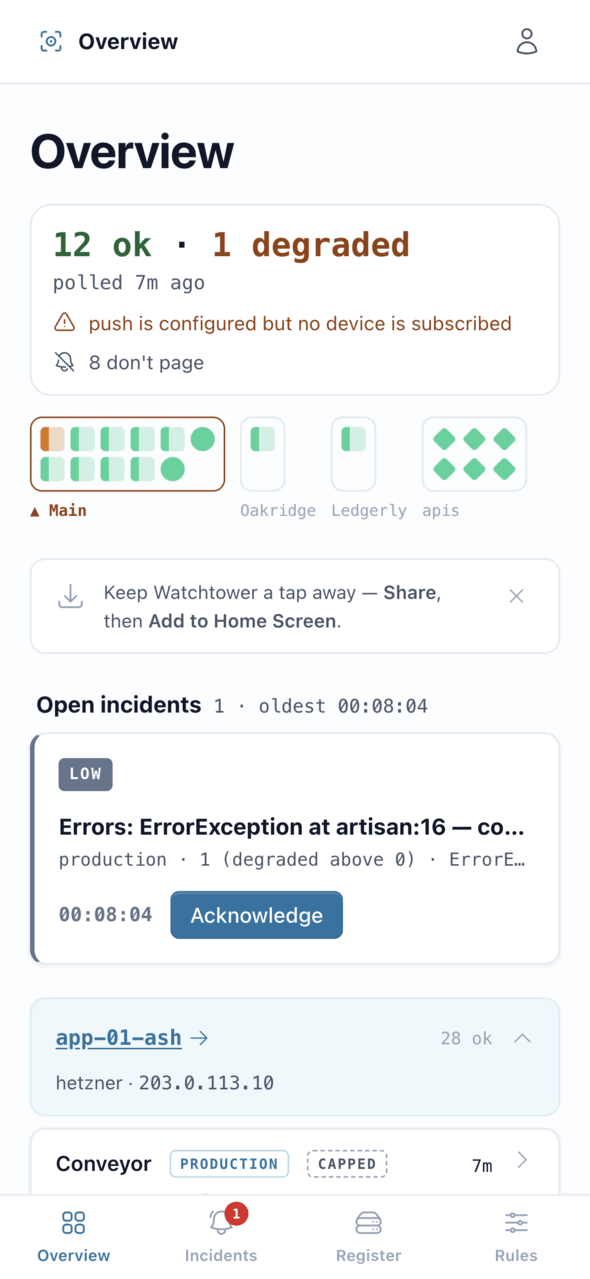
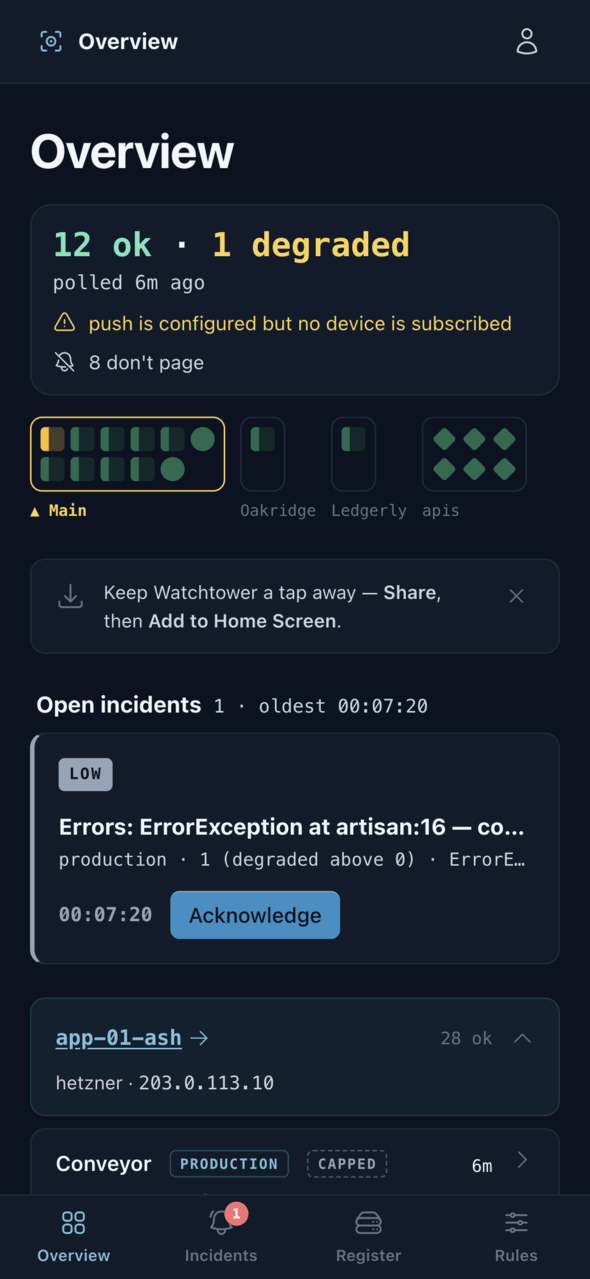
The overview on a phone: a status summary, a tile per server, and the one open incident with an Acknowledge button
The Whole Fleet at a Glance
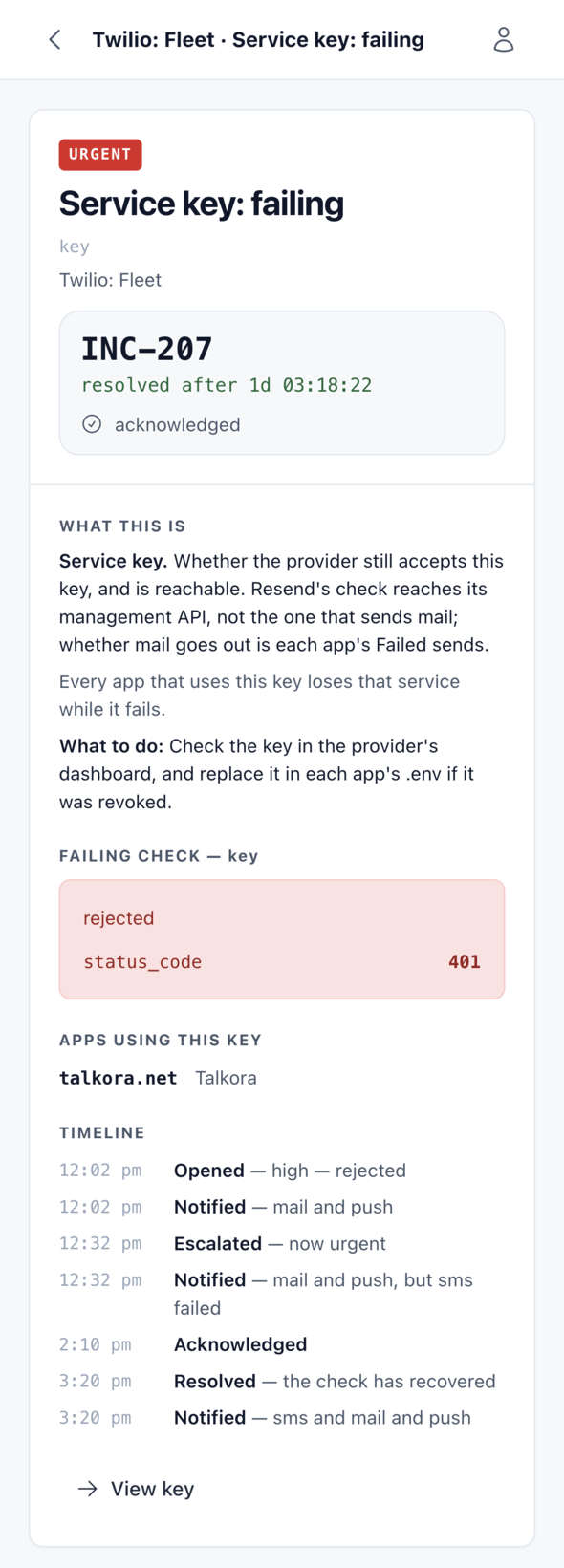
An incident page for a rejected service key, with what the check means, what to do, and a timeline from opened through escalated and acknowledged to resolved
One Incident and Its Timeline
The same overview in dark mode
At 3 a.m., in Dark Mode
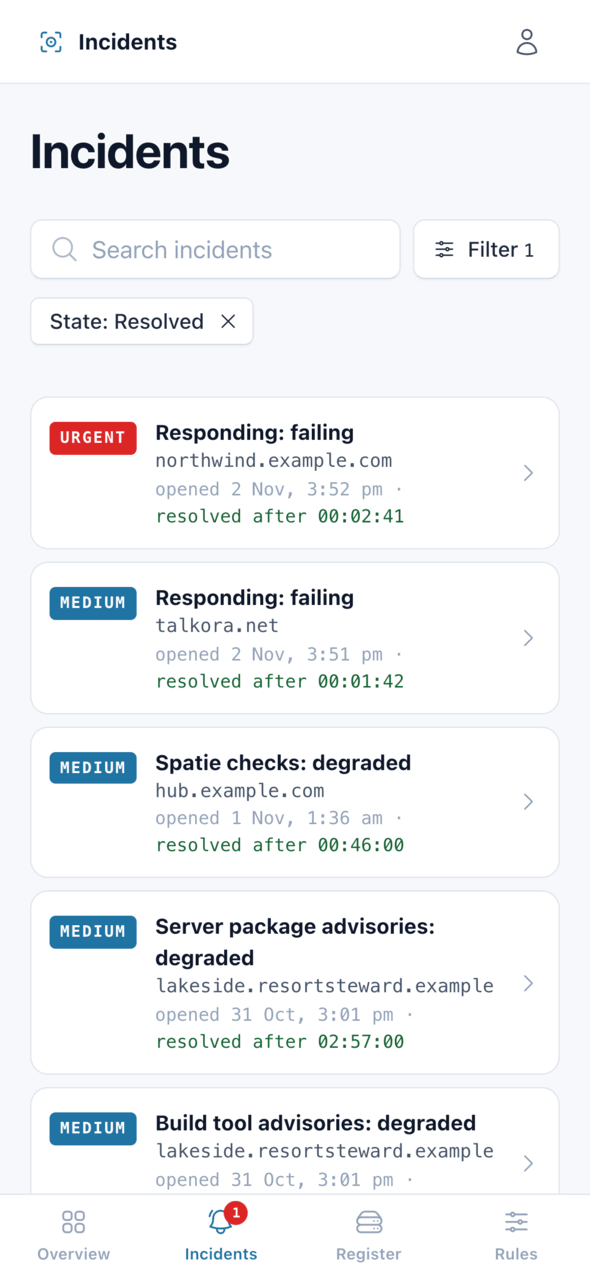
The list of resolved incidents, each with its severity, the app it concerned, and how long it lasted
Every Incident and How Long It Lasted
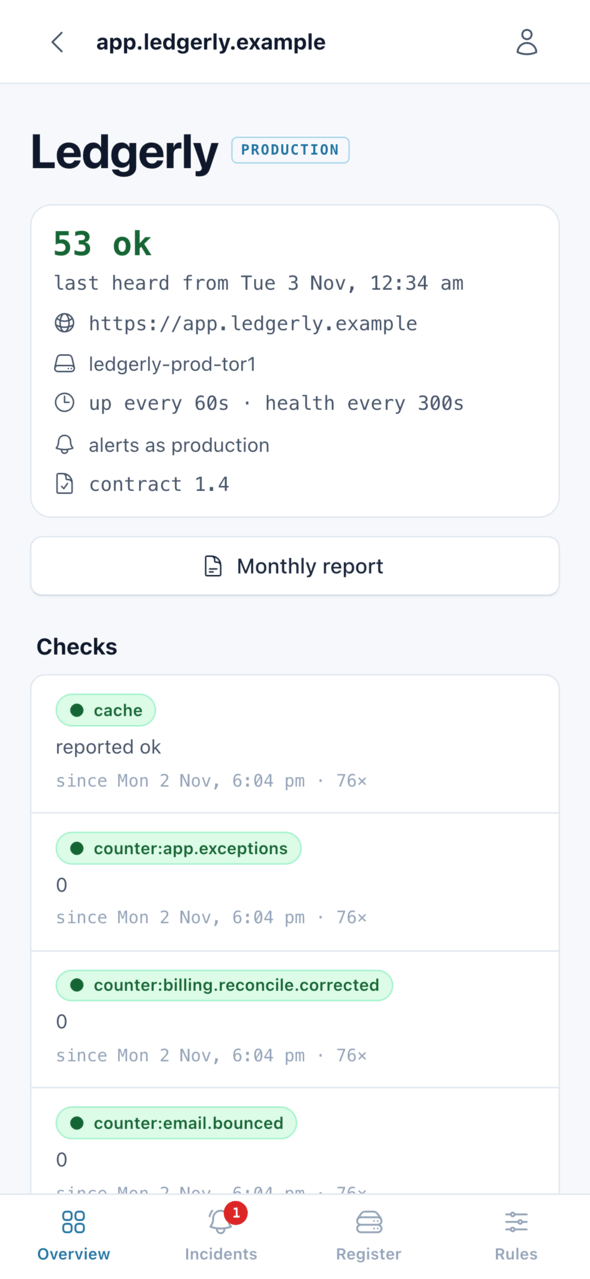
An app's page showing 53 checks ok, how often it is probed, and each check with its latest result
One App, Every Check
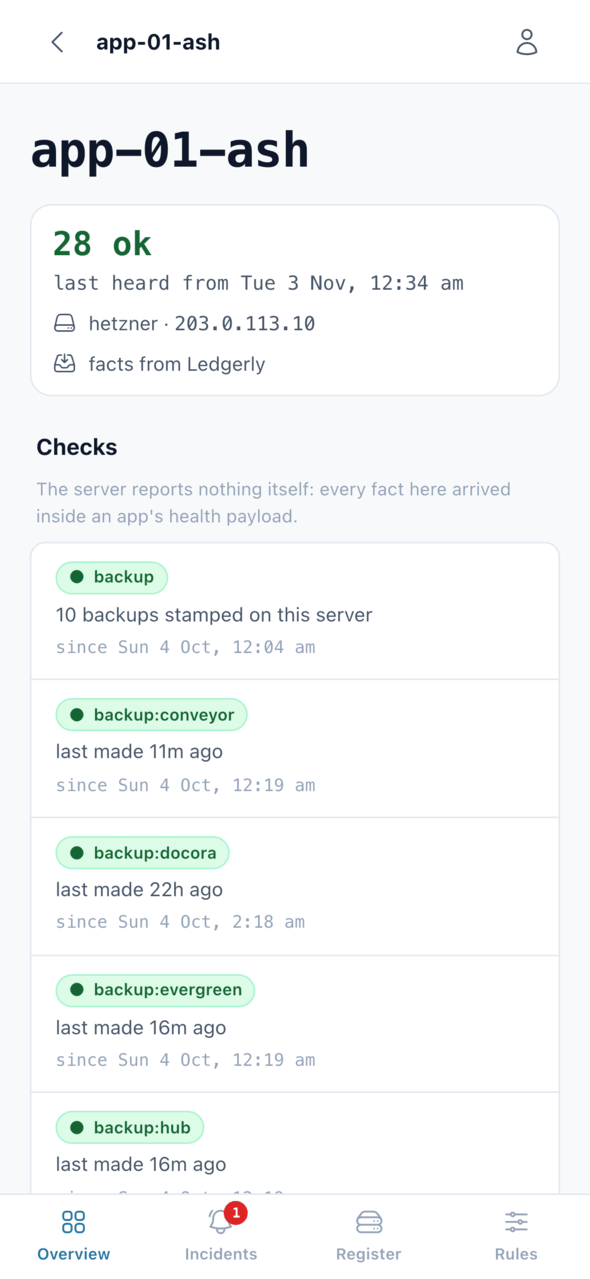
A server's page listing its backups, each with when it was last made
A Server and Its Backups

Proof It Was Watched

Quiet weeks should still leave a record behind.

Every Week

The weekly digest

A grid of the week's incidents by server and kind of problem, which makes a problem that keeps coming back on the same server easy to spot.

Every Month

A report per app

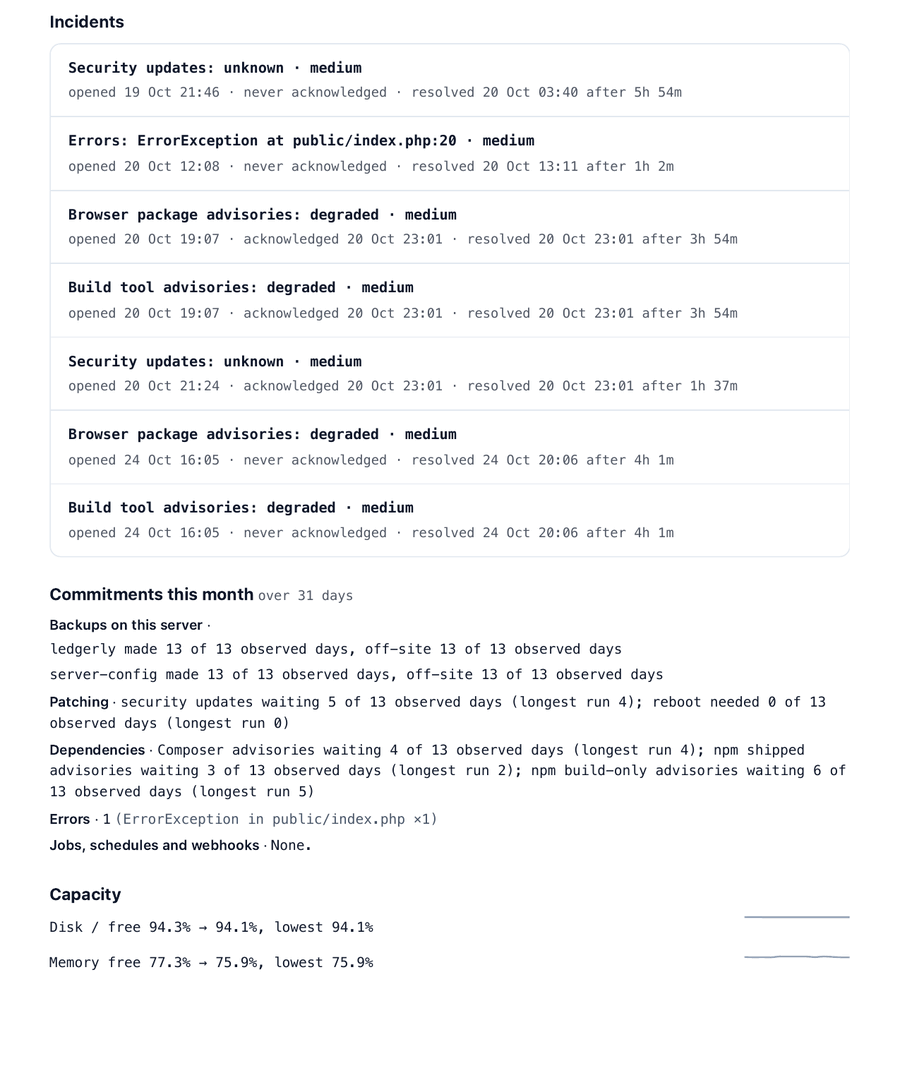
Uptime against target for the app and each of its addresses, every stretch of downtime, every incident, and whether backups, patching and dependencies kept up. It also tracks disk and memory over the month, prints to PDF and comes with a plain-text version to paste into a note.

We Watch It, or You Do

It's the same Watchtower either way. What changes is whose server it runs on and who holds the pager.

Path One

We run it for your apps and sites

Your apps are registered on the Watchtower we already run, on our servers rather than yours. We set it up, tune the thresholds to what matters for your business, and keep it running.

Nothing new to host or maintain
Websites need no changes at all; Laravel apps get one small package
A monthly report for each app, ready to pass along
Ask us to watch your apps
Path Two

Run your own Watchtower

If you'd rather keep monitoring in-house, Watchtower runs on a small server of your own, so you hold the register, the thresholds and the alerts yourself.

The same health package in each app, reporting to your Watchtower instead of ours
The report answers only to Watchtower's key, and anyone else gets a 404
We help with the first register and thresholds, then it's yours
Talk to us about running it

See It in Action

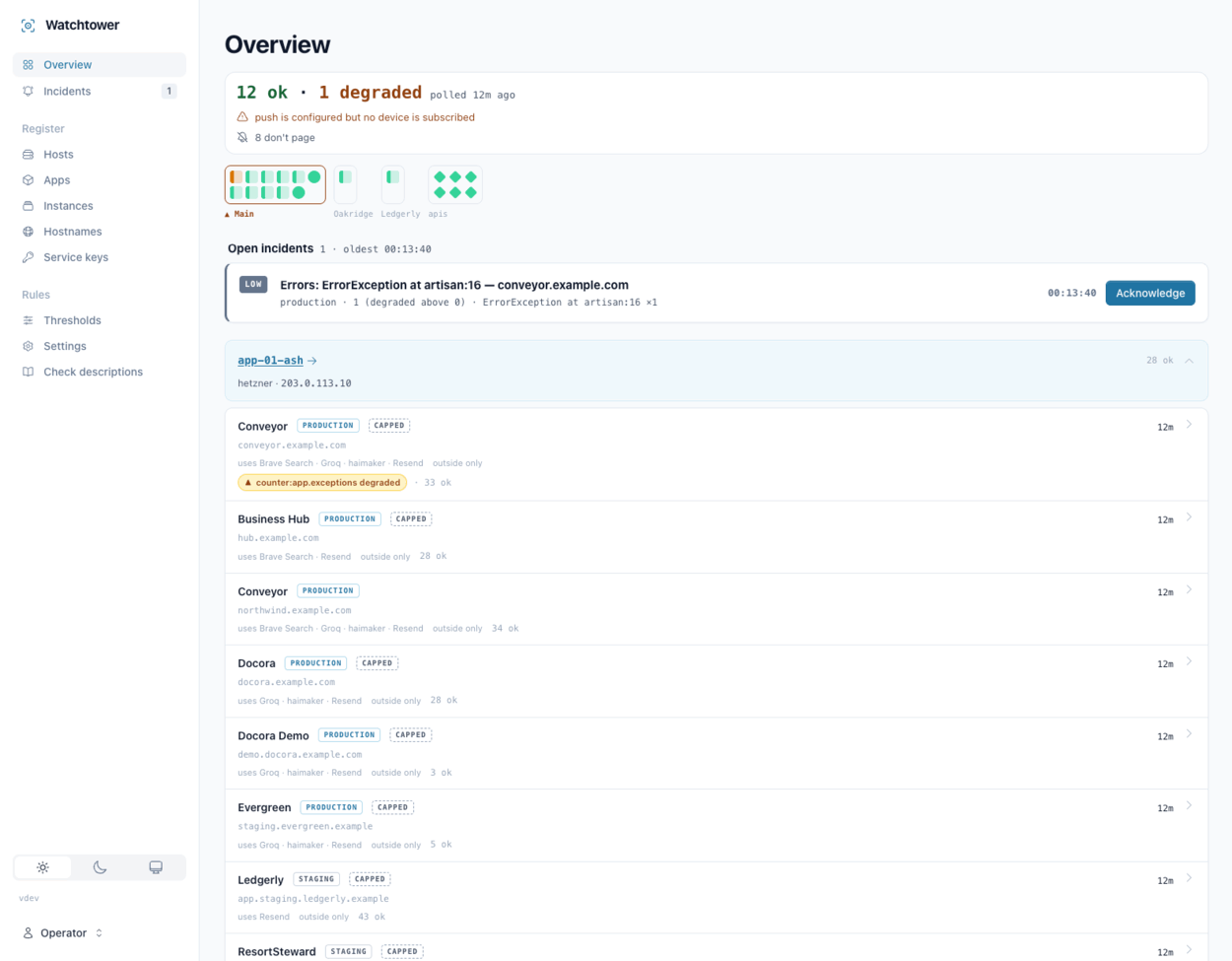
The overview on a desktop, grouped by server, each app with its environment, the services it uses and its check count
Overview, Grouped by Server
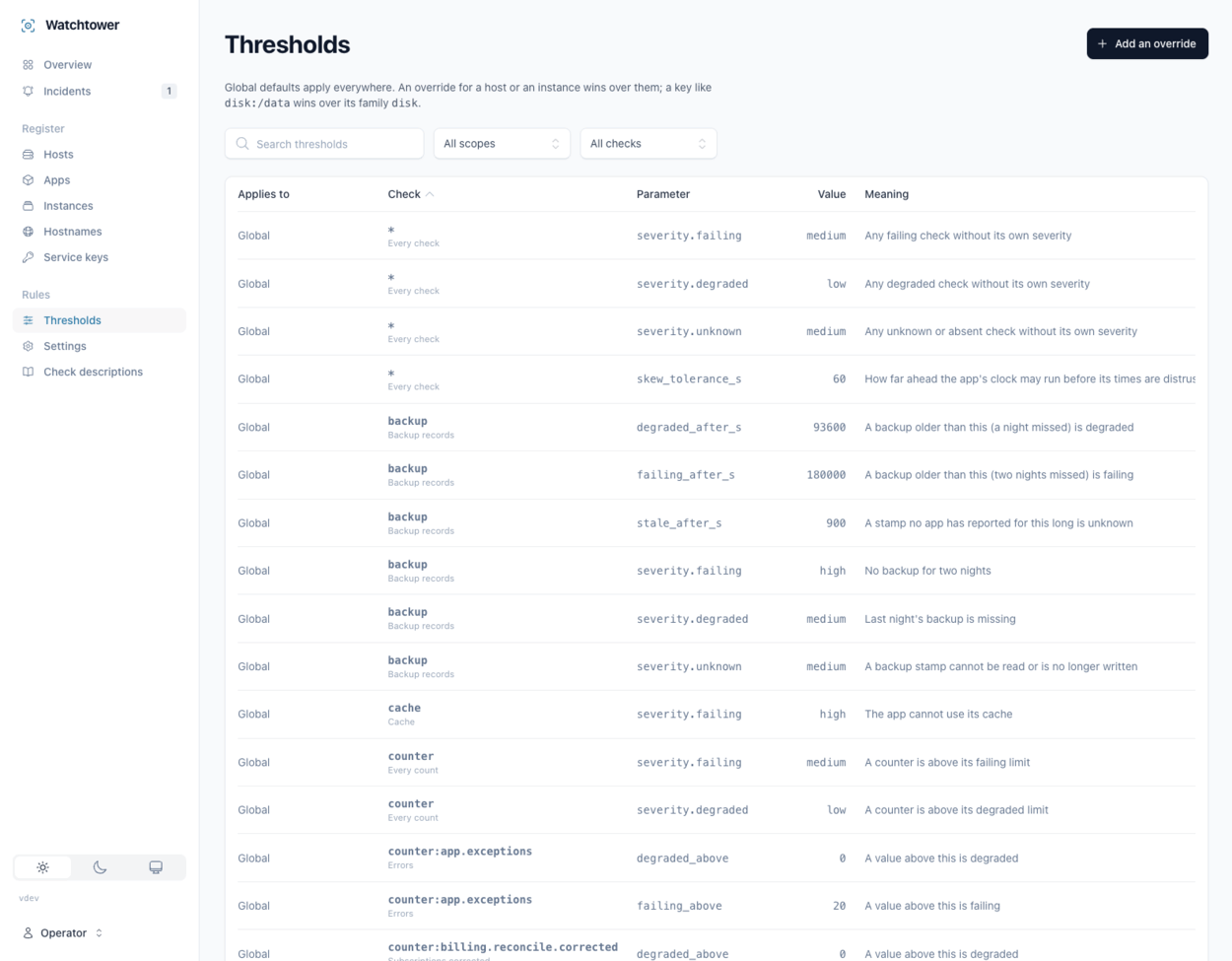
The thresholds table: global defaults for each check, each with its value and a plain-English meaning
Thresholds, in Plain English
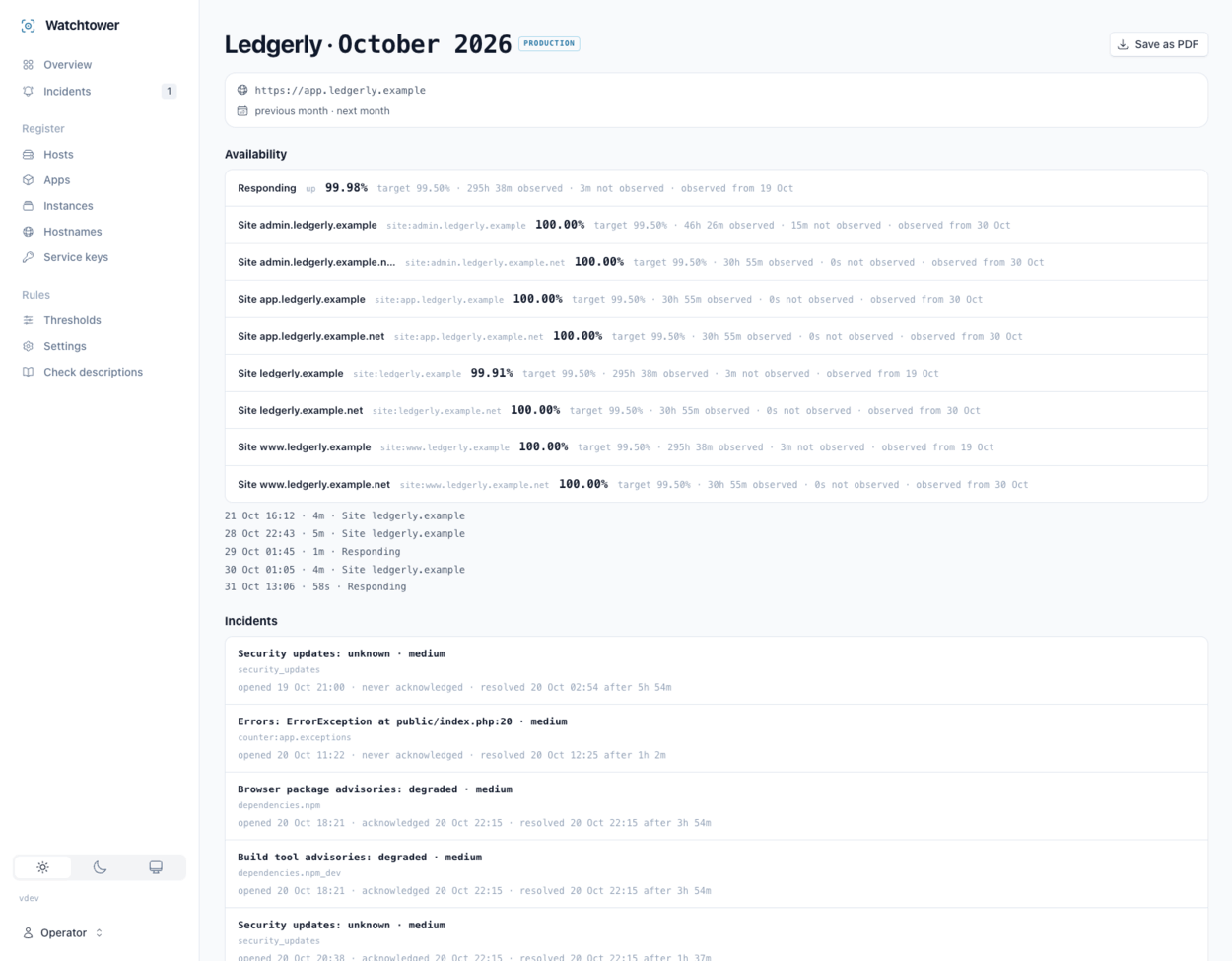
A monthly report for one app: availability per address against a 99.5% target, the downtime stretches, and the month's incidents
The Monthly Report, In the App
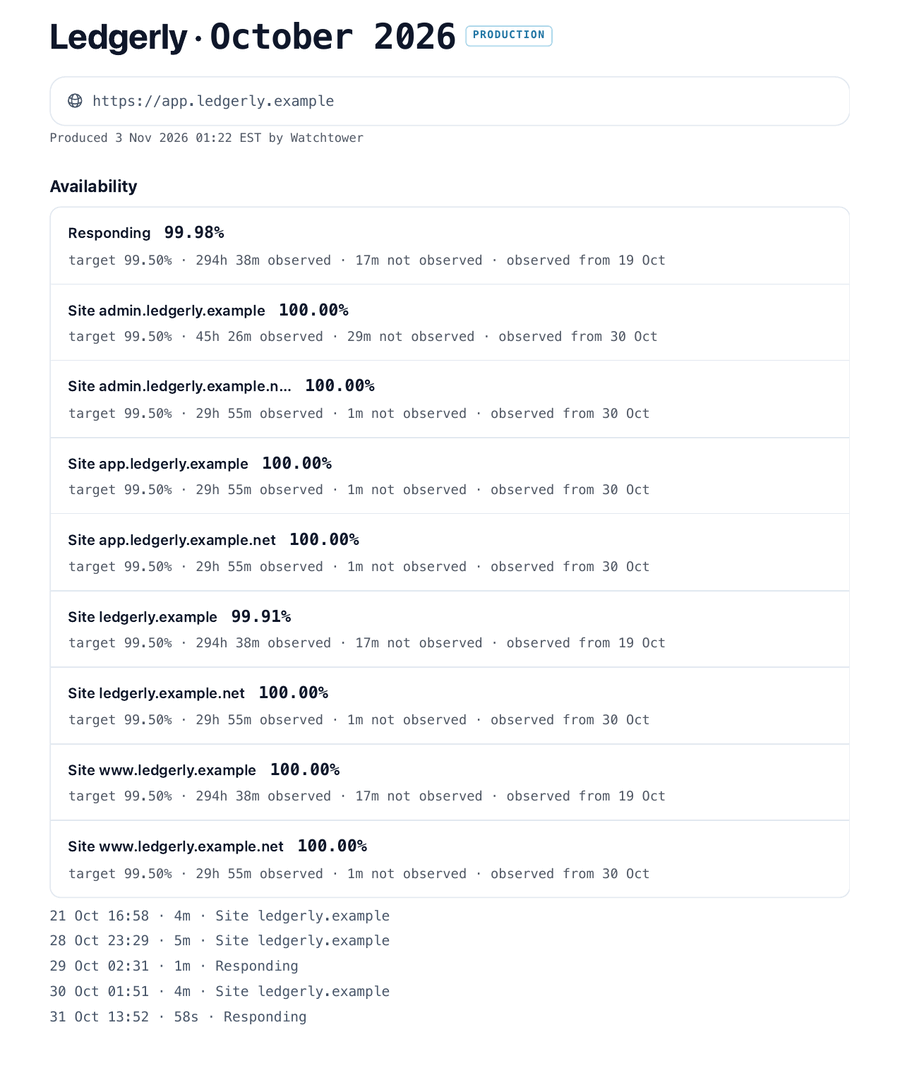
Page one of the monthly report saved as a PDF: availability for the app and each of its addresses against a 99.5% target, and the month's downtime stretches
The Same Report as a PDF
Page two of the PDF report: the month's incidents, then backups and off-site copies, patching, dependencies and errors as days observed, and disk and memory over the month
PDF Page Two: Commitments Kept
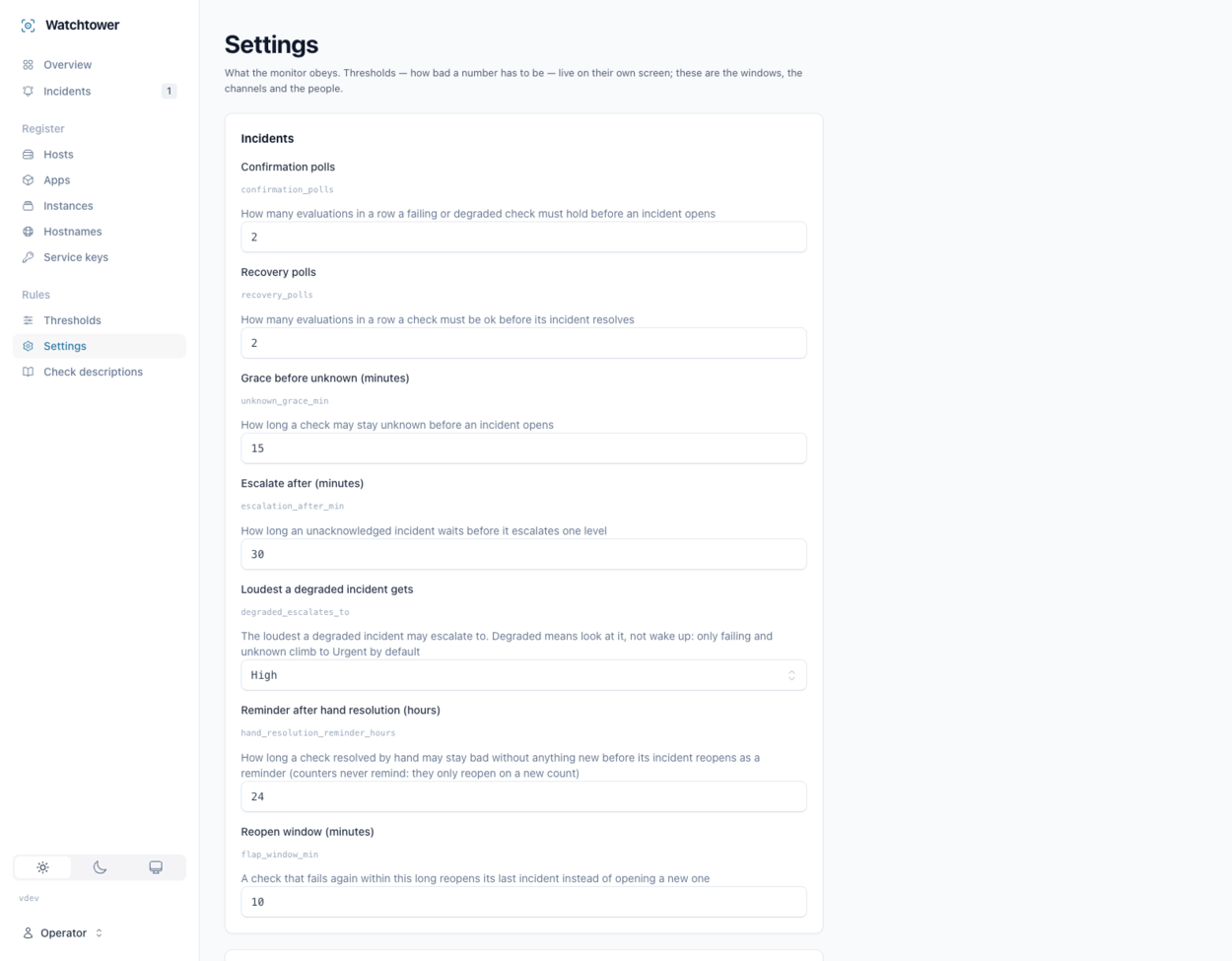
Settings for confirmation and recovery windows, escalation timing and the reopen window, each explained in a sentence
Windows and Escalation, Explained

When Watchtower Is the Wrong Answer

The cases where we'd point you somewhere else.

Your apps aren't Laravel. Any website gets the outside checks: is it up, does it say what it should, is its certificate good. The deep checks inside an app come from the Laravel package.

You need to trace one slow request. Watchtower counts errors and never stores their contents. Following a single request through your code is a job for a tracing tool.

You run one site on one server. A simple uptime service that pings the address will tell you most of what you need for less.

You want a public status page. Watchtower is for the people who fix things and has no page for your customers.

Hear About It Before Your Customers Do

Tell us what you run and where it runs, and we'll show you what watching it from outside would look like.

Back to Apps