Home
Talkora Docora Conveyor ResortSteward
Custom Development Consulting AI Discovery Days
Insights Partners Contact

Conveyor

Data in one end. Finished work out the other.

A platform for running AI work, with permissions, budgets, schedules, audit trails, and failures you can actually see.

Why AI Pilots Stall

It's rarely the model.

The script works on someone's laptop. Nobody else can run it, and nobody should, because it holds the API keys.

Nobody knows what the AI spend will be until the invoice lands. There is no ceiling on it and no breakdown of it.

When a run dies at 2am it dies quietly, and you find out days later from the gap in the results.

There is no record of what ran or who it ran for, so it never gets past being a pilot.

Work Moves Down a Line

Instead of one giant job, you get a sequence of small ones that each do a single thing.

Collect

A job brings raw material in: a search, an API, a spreadsheet, a mailbox.

Filter

A cheap pass discards what doesn't qualify, so costly work only touches survivors.

Enrich

The survivors get the expensive treatment: full page reads, AI extraction, lookups.

Deliver

Finished work leaves the line as a spreadsheet, a draft email, or a record in another system.

The stations never hand work to each other directly. They all read and write one shared, persistent store, and every record carries a status. A job's rule is: pick up everything marked X, do my part, mark it Y.

Every Station Picks Its Own Model

Which model runs at each stage is a setting you control, and the difference shows up in both the bill and the results.

A first-pass filter skimming thousands of short snippets wants a fast, cheap model. The stage that reads a full page and makes a judgment call wants a careful one. Because the work is split into stages, each one gets what it needs.

The stages that touch sensitive material can run on a model hosted on your own hardware, while the rest of the line uses a commercial provider.

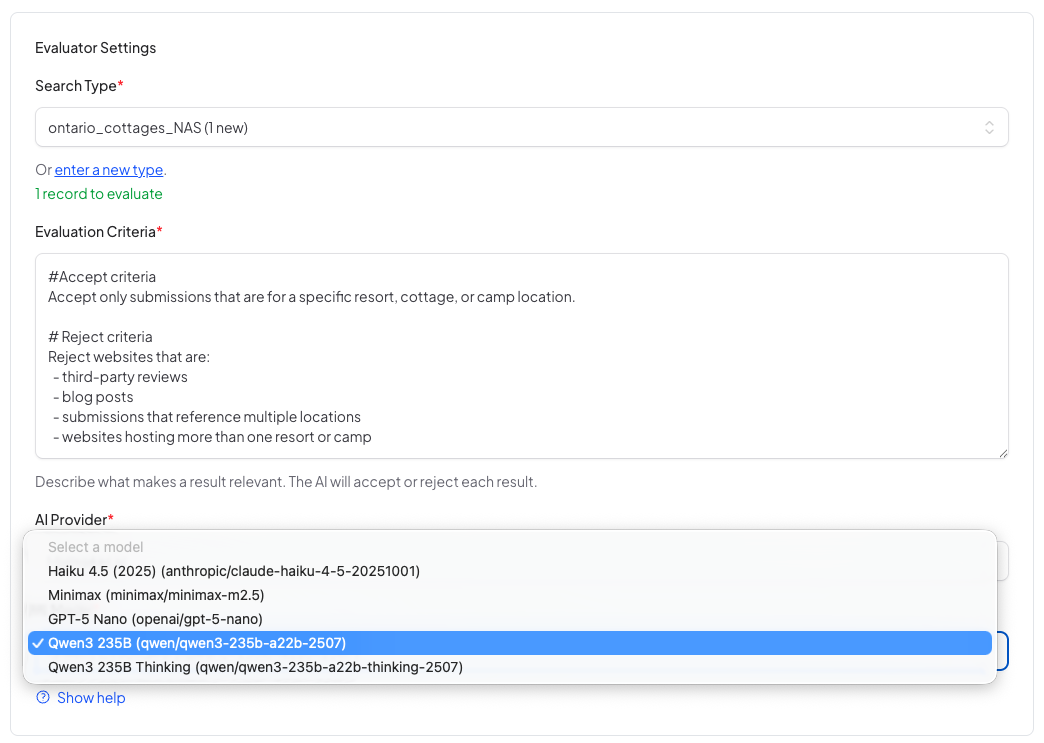
The model is a setting on the job rather than something buried in code, so tuning a stage takes a minute in the interface and no deployment.

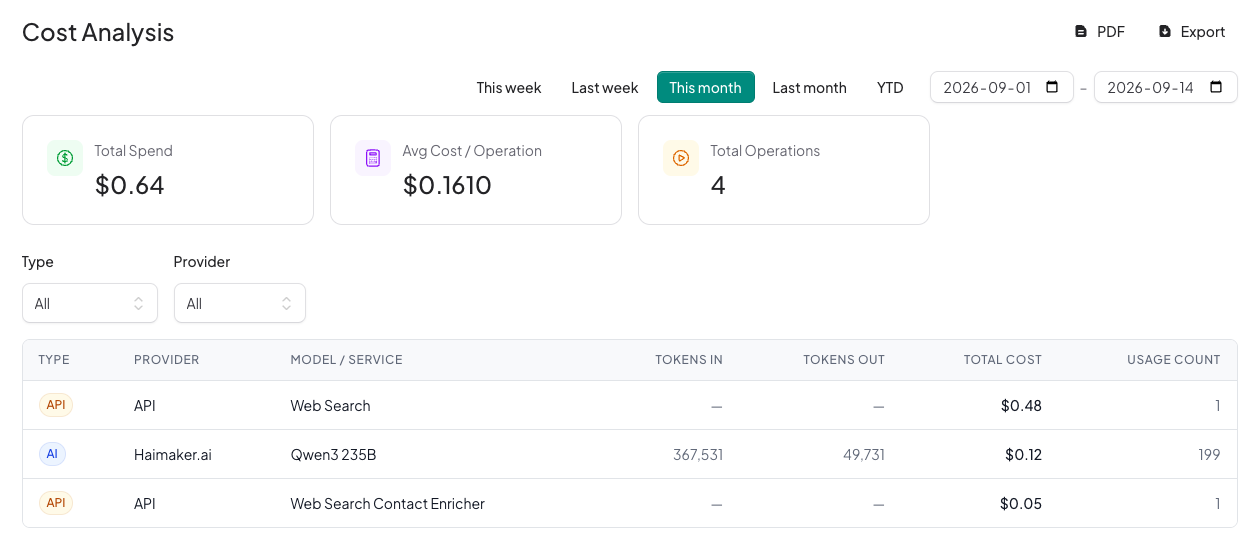
Cost is tracked per model and per job, so you can see what each stage is actually spending and move the ones that aren't worth it.

Your organization decides which models exist in the first place. A super admin registers the providers and models that are allowed, and no job can reach anything that isn't on that list.

Because the model is set per job, one department can run the same job against an in-house model while another uses a commercial one, without anybody forking the code.

Re-run One Station, Not the Whole Line

Because the work lives in the store rather than in flight, you never have to start over. If too much junk is getting through, you tighten the filter and re-run just that stage against data you already paid to collect.

The Unglamorous 80% Is Already Built

Everything a business needs around the AI, so the only thing left to build is your actual work.

Control & Cost

Spend budgets checked before every AI call, per user and per department
Every call logged with tokens, cost, model, user and job
Three layers of permission: role, department, and record-level sharing
Everyone signs in, and people see only their own department's work unless it's shared
Cost, usage and budget reports, exportable to Excel or PDF
API keys encrypted in the database, managed in the admin screens
If a provider fails, the same model on a second provider picks up the call

Running the Work

Run on demand or on a schedule, with timezone handling
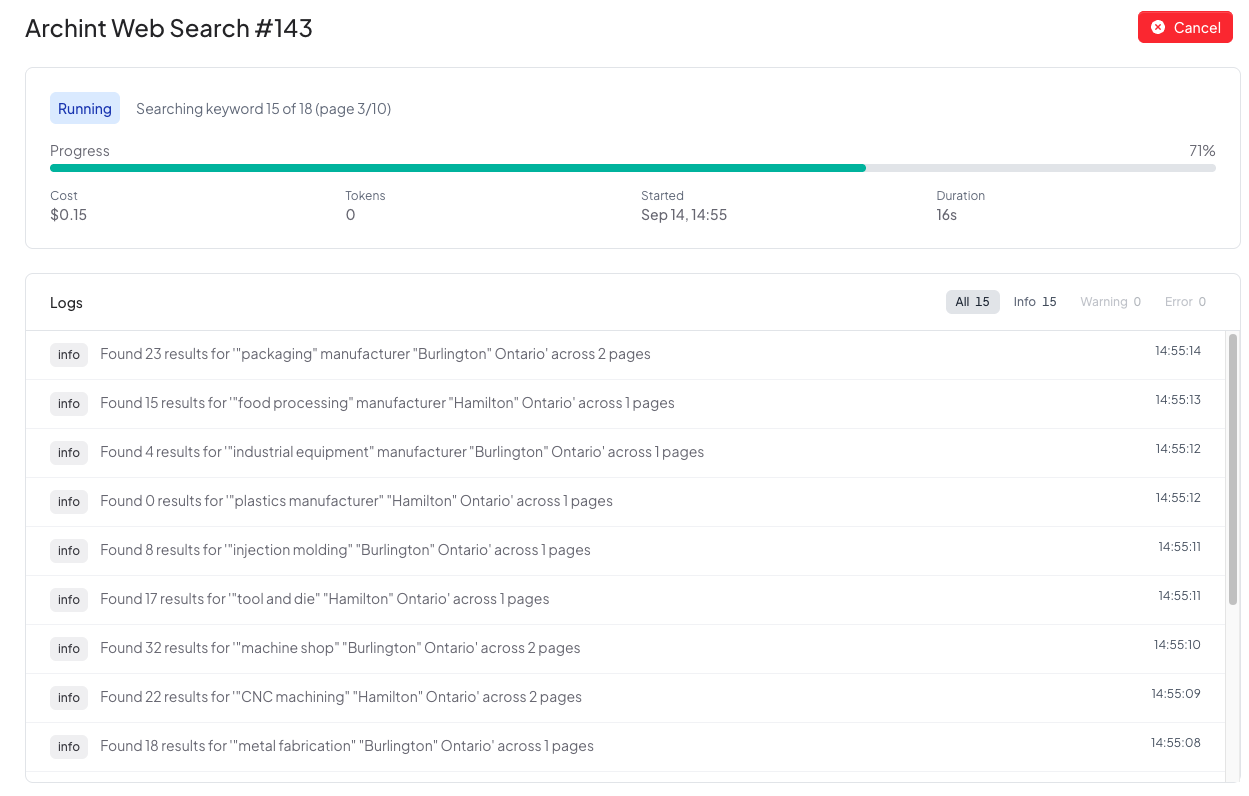
Live progress you can watch, plus cancel and retry
A guided form per job, so users configure without touching code
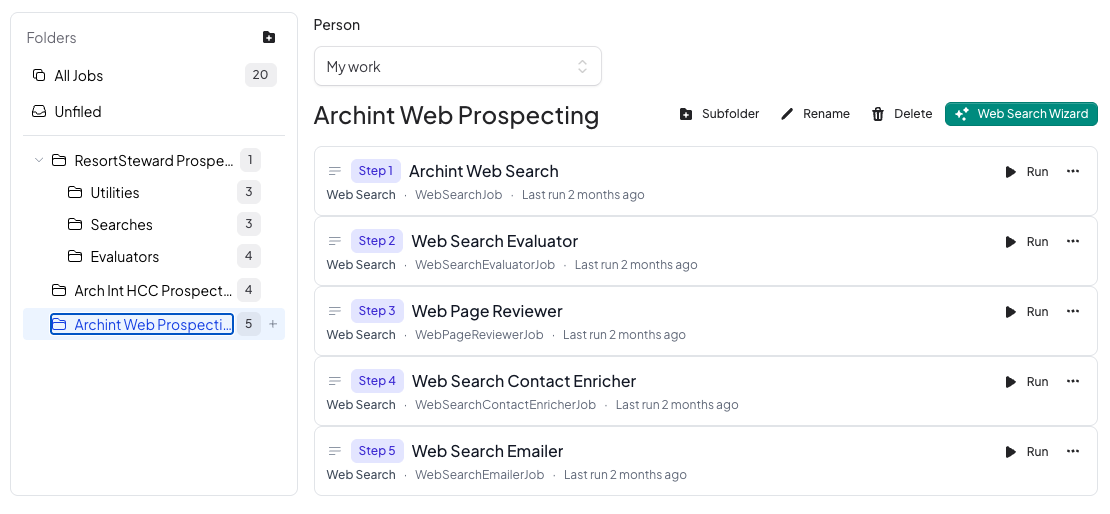
Folders to organize campaigns, and one click to run a whole pipeline
Connect Google and other accounts once; jobs never see a credential

Trust & Operations

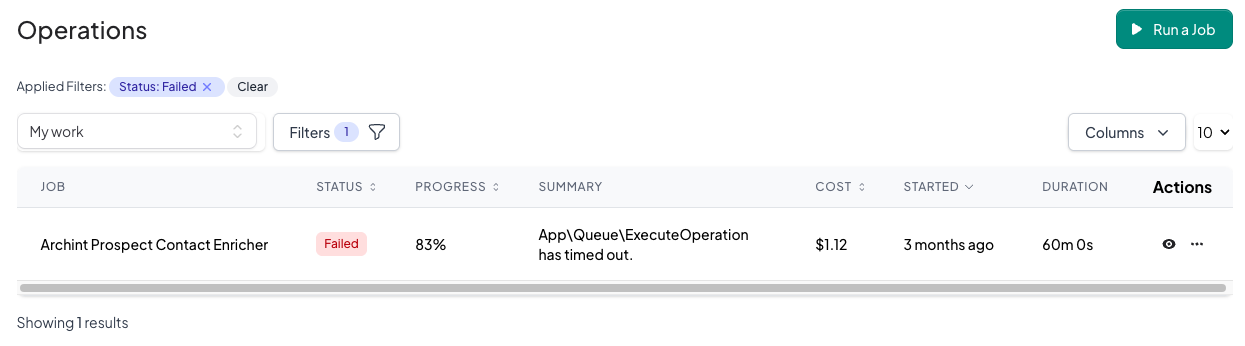
Failures show up in the interface with the reason attached
A partly-failed run keeps what worked and tells you what didn't
Full audit trail of who changed what, exportable for compliance
Health checks on database, queue, disk and connections, with email alerts
Nightly backups, invitation-based onboarding, in-app notifications

Use What's Built, or Get Yours Built

It's the same platform underneath either way, and the only difference is what runs on it.

Path One

Run the modules that already exist

Prospecting is live today. It's a complete pipeline that finds organizations matching a description you write in plain English, filters out the noise, reads the survivors in full, pulls contact details, and drafts the first outreach email.

Describe what you're looking for in an interview — no queries to write
The whole campaign is built, tested against live results, and set up for you
A do-not-contact list is enforced across every campaign
Results export to a spreadsheet your team can work from
See it run on your market
Path Two

Have your own work built onto it

If your process isn't prospecting, the platform doesn't much care what a station does. We write the job that does your work and put it on the line, where it gets every control on this page automatically.

No new admin system, login, permission model or reporting to build
Weeks of work instead of months, because only the new part is new
Your jobs stay in your own instance and aren't shared with anyone
Start with one job and grow the line as the process proves itself
How custom development works

What a Real Campaign Looks Like

One prospecting run, start to finish.

13

searches, written by the platform from a plain-English brief

435

results collected, then read and sorted without anyone reading them

39

qualified organizations with a usable contact email

Most of what enters gets thrown away on purpose, which is how a funnel works. Nobody had to open 435 tabs to get to the 39, and every rejection is recorded, so you can see why something was dropped and change the rule that dropped it.

Describe the Campaign and It Builds Itself

Setting up a pipeline by hand means writing search queries and two sets of AI instructions, and keeping four jobs consistent. The wizard replaces all of that with an interview.

1

Brief It Like a Colleague

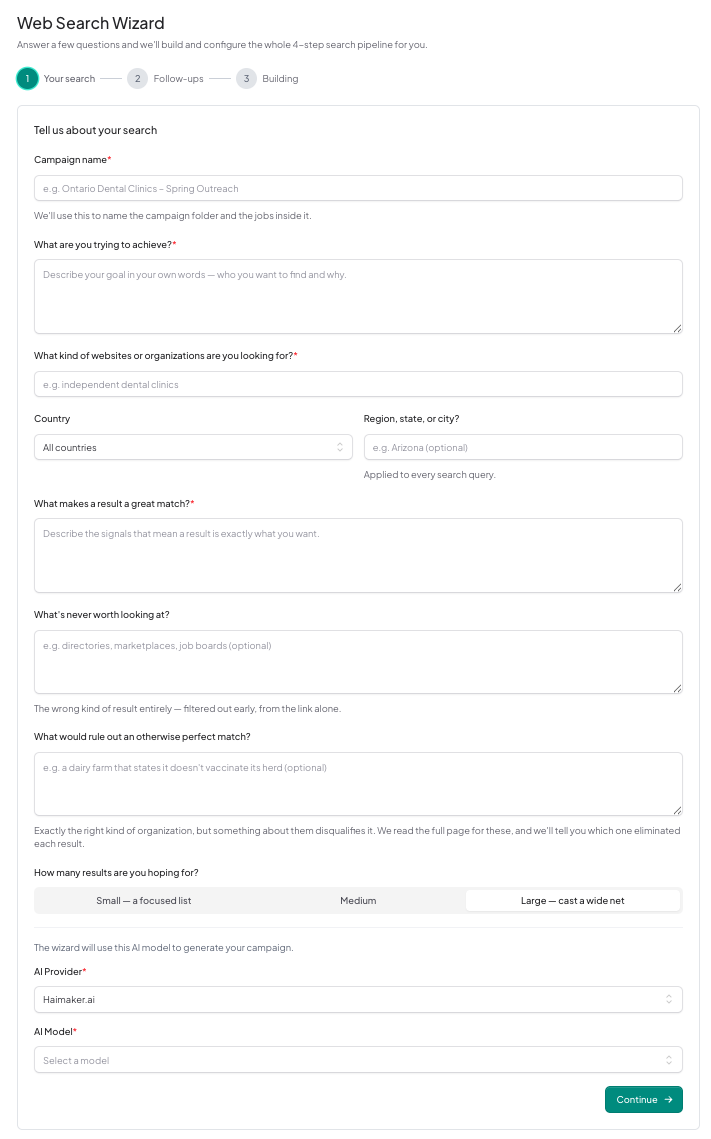
Who are you trying to find? What makes one a great match? What should be thrown out on sight? You answer in plain English, and the AI asks follow-up questions where your answer would sharpen the search.

2

It Drafts, Then Checks Its Own Work

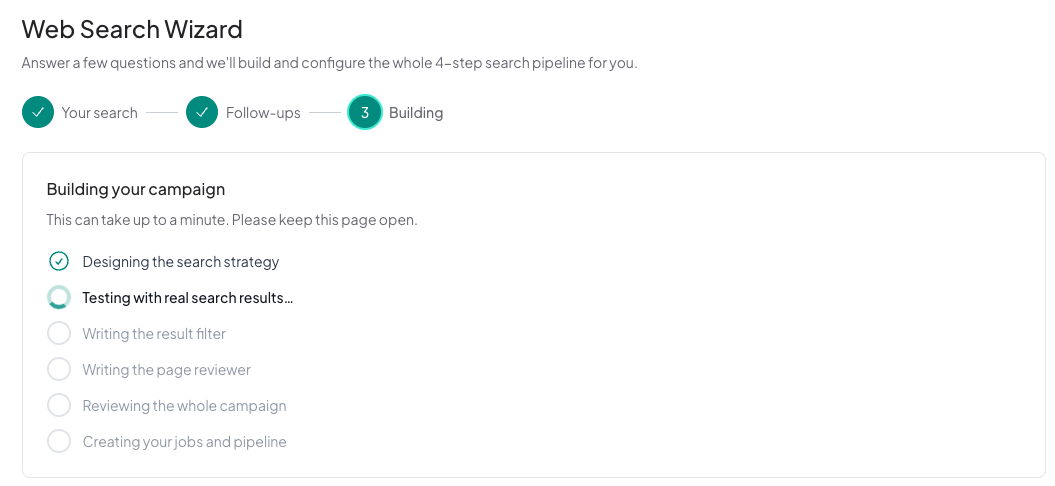
From your brief it writes the search queries, the sites to ignore, the quick reject rules and the detailed reading instructions. Then it runs some of those queries against live search results and scores how relevant they came back. If the score is poor it rewrites them and tries again.

3

You Get the Whole Line

You get a campaign folder with every stage configured and connected, plus a one-click button to run the full pipeline and another to wipe the data and start clean. You watch the build happen on a live checklist.

A Few Minutes, and a Few Cents

The interview, the drafting, the live test and the final review together take one to three minutes and cost a few cents in AI usage. The skill that used to live in the head of whoever set these up by hand is now in the wizard, so anyone on the team can start a campaign and the quality doesn't depend on who did it.

Your Server or Ours

Pick the arrangement that matches how much your data is allowed to travel.

On Your Premises

If you can run a small Linux instance, you can run Conveyor. It sits inside your network on your own hardware, and your data never leaves the building.

Hosted by Us

If you'd rather not run a server, we host your instance on a secure, dedicated deployment and handle the updates, the backups and the monitoring.

Your Own AI Models

Point it at OpenAI or Anthropic, or at a model running on your own hardware. Files stay on local storage either way, because there is no cloud bucket anywhere in the design.

Where This Fits

Anywhere the work is repetitive, high in volume, and mostly judgment calls about text.

Prospecting & Lead Research

Document & Quote Processing

Compliance & Regulatory Sweeps

Market & Competitor Monitoring

Inbox & Request Triage

Data Cleanup & Enrichment

See It in Action

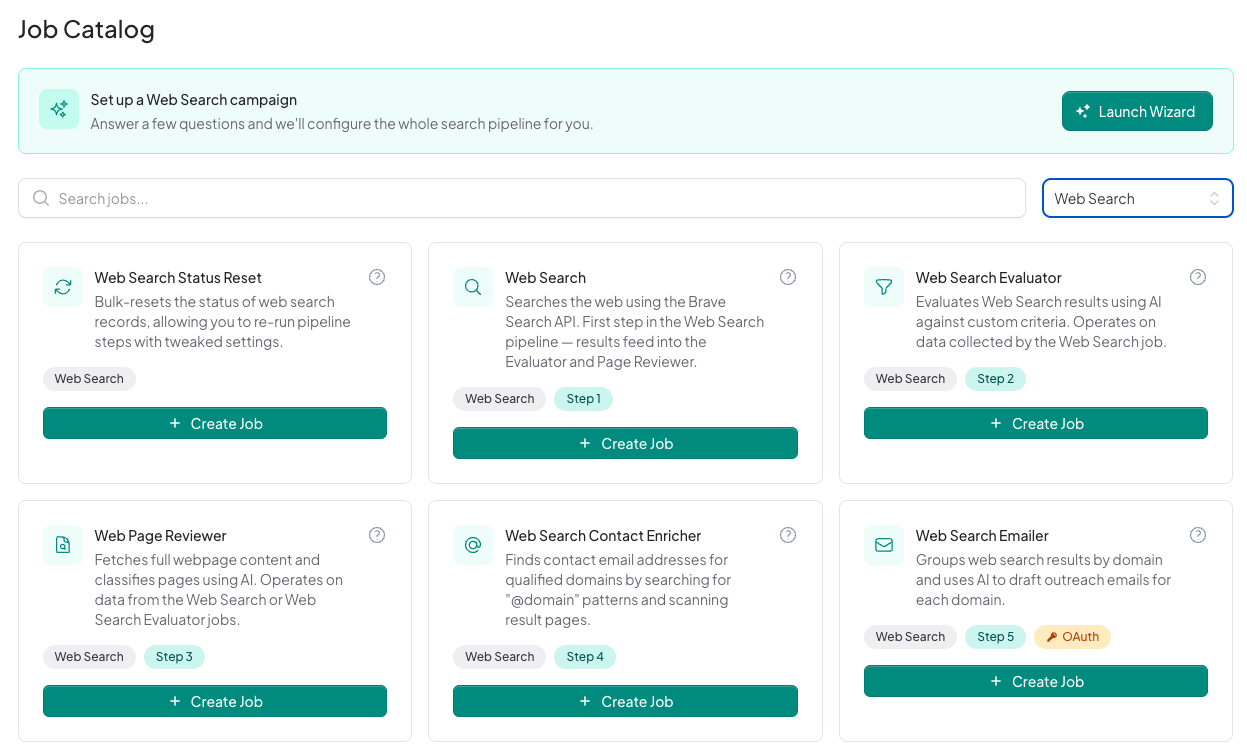
The Job Catalog, showing the available jobs each tagged with its step in the pipeline
Job Catalog
A campaign folder expanded to show its five jobs in order
A Campaign, Step by Step
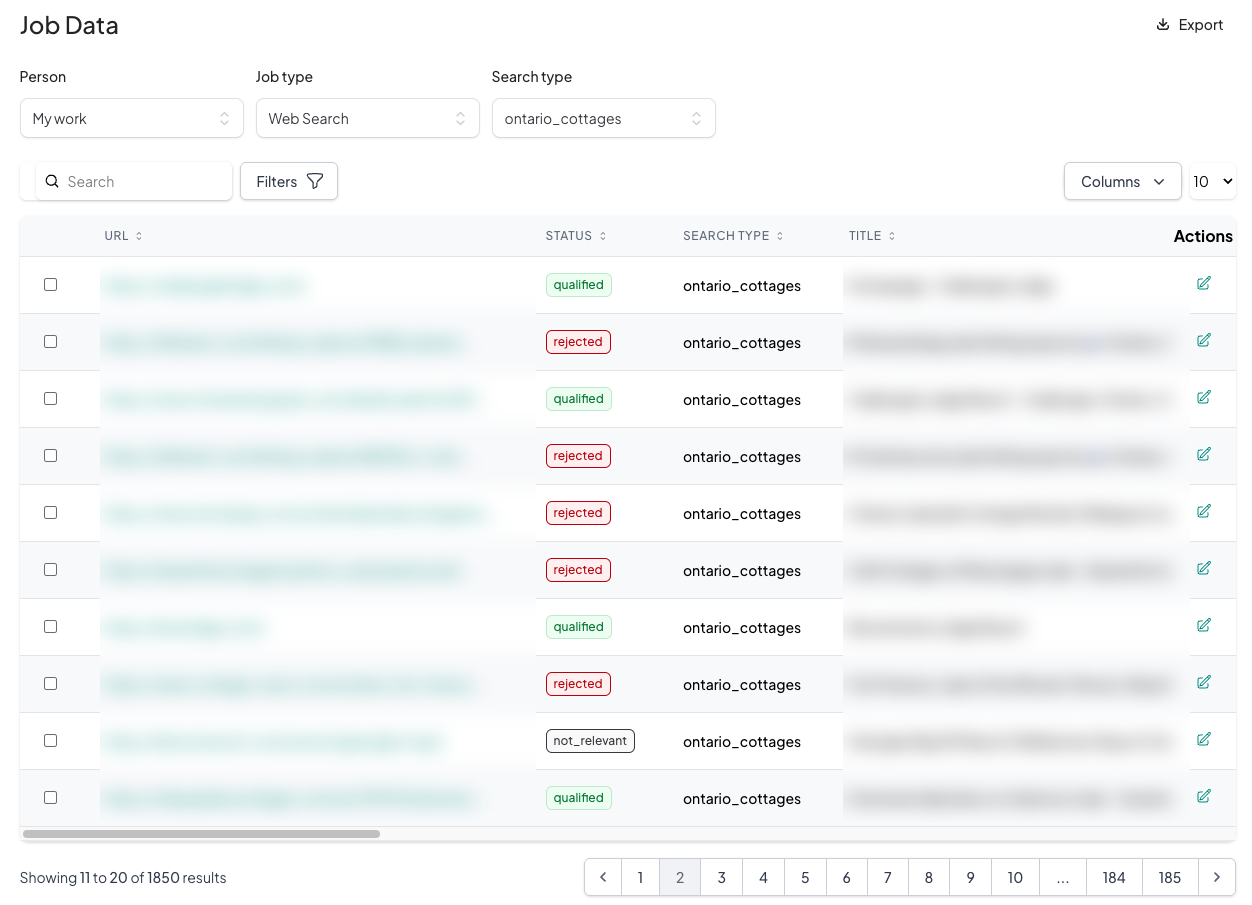
The shared job data store, each record carrying a status of qualified, rejected or not relevant
The Shared Data Store
A job running, showing progress, accruing cost, a cancel button and a live log
A Run in Progress
A failed operation listed with its reason, the progress it reached and the cost it incurred
A Failure, With the Reason
A job's settings with the AI model dropdown open, showing the models the organization has registered
Choosing the Model for a Stage
The wizard interview, asking in plain English what you are looking for and what would rule a result out
The Wizard Interview
The wizard building a campaign, testing its generated queries against real search results
Building the Campaign
Cost analysis broken out by provider and model, with a date range control
Cost, Broken Out by Model

When Conveyor Is the Wrong Answer

The cases where we'd tell you to do something else.

A plain rule would do the job. If the test is "reject anything over $500", that's an if-statement. There's no reason to pay a model to do arithmetic, and a rule you can read is easier to trust than one you have to sample.

The answer has to be explainable. If you have to show an auditor or a regulator exactly why a decision went the way it did, a deterministic system you can point at beats a model you can only describe in general terms.

Being wrong is expensive. Where an error carries real regulatory or safety consequences, a stage that's right most of the time is a liability rather than a saving.

The process already works. If it's well structured and stable today, adding AI mostly adds cost, complexity and risk. When the change wouldn't materially improve the outcome, the right move is to stop.

Somebody is waiting for the answer. This is batch machinery that runs for minutes or hours. If a customer is at the other end of the request, you want an API call inside your application instead.

The volume is low. If you work through thirty of something a month, a person with a spreadsheet will be quicker to set up and cheaper to run than any pipeline.

If an off-the-shelf product already covers your workflow, buy it. And if what you want is answers out of your own documents, that's Docora, not this. The longer version of how we decide is in A Practical Decision Framework for Choosing AI Solutions.

Bring Us a Process You've Been Putting Off

If it's repetitive and nobody wants to do it, there's a good chance it belongs on a line.

Back to Apps