March 9, 2026
In my last post, I discussed the five structural reasons AI initiatives fail. The pattern is consistent: most failures stem from strategic, architectural, or operational errors, not the technology itself.
So how do you avoid those failures? In this post, I’ll walk through the framework I use when helping companies evaluate and implement AI. It’s the same structured approach whether the engagement involves AI or not, because the fundamentals of a successful initiative don’t change just because AI is part of the solution.
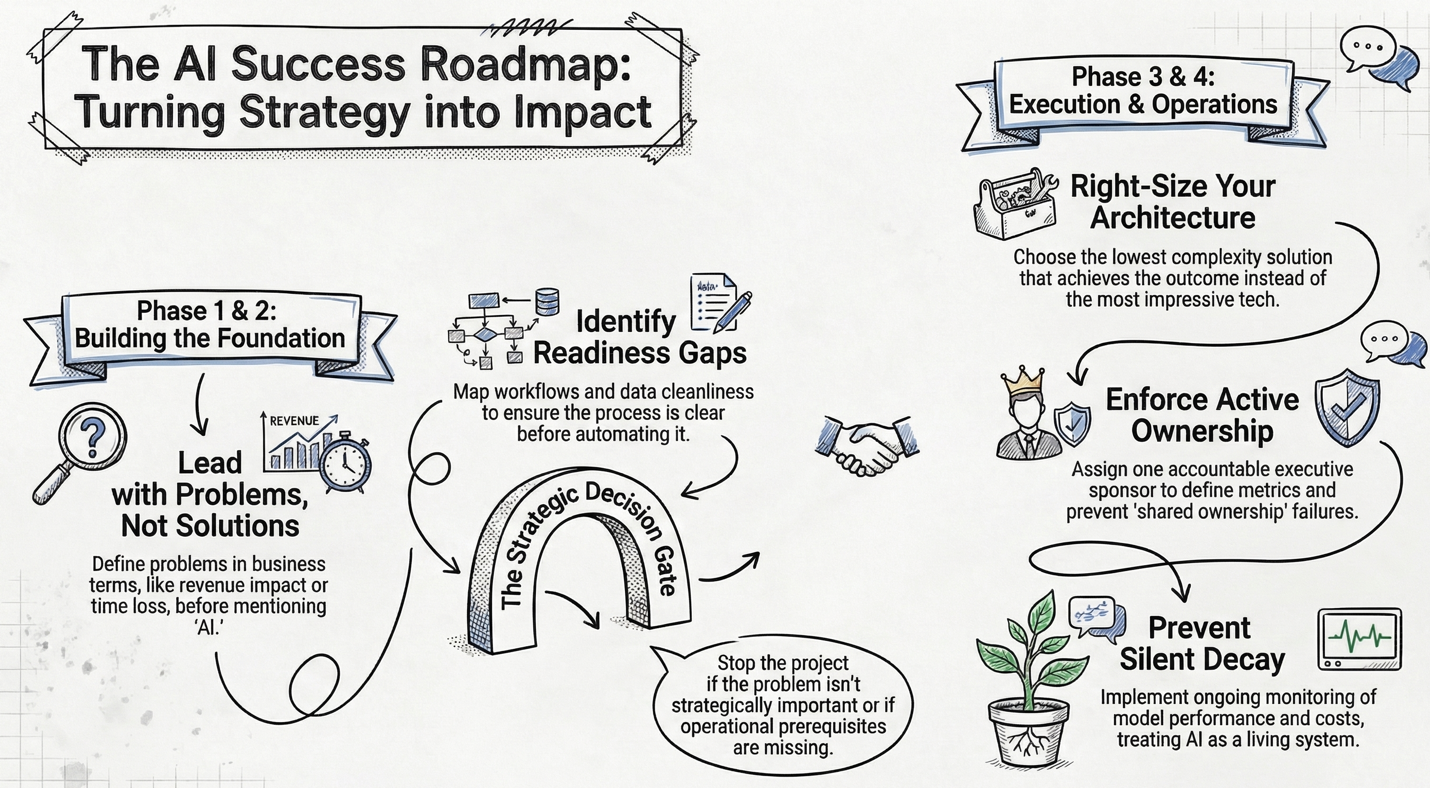
Phase 1 — Strategic Framing
Should we even be doing this?
The single most common mistake I see is companies starting with a solution instead of a problem. “We need AI” is not a problem statement. “We lose 18% of inbound leads due to slow follow-up” is.
This phase is about defining the problem in business terms – quantifying cost, time, risk, and revenue impact – and then prioritizing it honestly against other business constraints. For smaller companies in particular, even a genuine opportunity needs to compete against the reality of limited bandwidth and resources.
When I run an AI Discovery Day engagement, this is where the morning starts: interviewing leadership, walking through key processes, and understanding the technology and data landscape. The goal is to understand your world before anyone says the word “AI.”
Decision Gate: Is this problem strategically important right now? Many initiatives should stop here.
Phase 2 — Feasibility & Readiness
Can we realistically solve this?
Once a problem is worth solving, the next step is mapping the current workflow in detail. Who touches it? What systems are involved? Where do exceptions live? Where does data come from, and how clean is it?
You’d be surprised how often companies skip this. They jump from “we have a problem” to “let’s buy a tool” without understanding the process they’re trying to improve. If the process isn’t clear to the people running it, AI will not make it clearer.
This is also where you identify readiness gaps: no clean data, no process owner, no internal technical skill, no monitoring capability, no governance policy. You don’t just identify solutions, but rather you identify missing prerequisites. In my AI Discovery Day process, this maps to the Opportunity Mapping phase, where the team collaboratively identifies and prioritizes opportunities using a structured framework.
Decision Gate: Are we operationally ready to attempt this? If not, solve readiness first.
Phase 3 — Solution Architecture
What category of solution fits?
This is where earlier posts in the series come together. The solution options range from process redesign (no tech at all) through off-the-shelf tools, automation platforms, autonomous agents, and custom development. The right question is: what is the lowest complexity solution that achieves the outcome? Not: What is the most impressive?
For each viable option, develop two or three scenarios estimating upfront cost, ongoing cost, implementation timeline, risk exposure, scalability, and governance implications. This forces discipline and avoids the “we just liked the demo” trap.
Decision Gate: Does expected benefit exceed cost and risk?
Phase 4 — Implementation & Operationalization
This is where most failures happen.
Implementation requires three things that smaller companies routinely underestimate: ownership, controlled scope, and ongoing monitoring.
Ownership means one accountable executive sponsor – not IT ownership, not “shared ownership.” That person defines success metrics, a monitoring plan, a review cadence, and an escalation path.
Controlled scope means piloting in one department, limiting scope, and instrumenting metrics from day one. No “big bang” rollout.
Ongoing monitoring means reviewing output quality, tracking costs, evaluating model performance, and logging edge cases. As I discussed in my previous post, AI is closer to a living system than any other technology you use. Without monitoring, performance degrades silently.
Decision Gate (Ongoing): Is this delivering measurable business impact? If not, refine or shut it down.
How This Maps to the Discovery Day
The framework above is exactly what drives my AI Discovery Day engagements. In a single day on-site, we work through the Discovery phase (strategic framing and process understanding), a tailored Education session (so your team understands the tools relevant to your business), a collaborative Opportunity Mapping workshop (feasibility, readiness, and solution options), and a same-day Readout of preliminary findings across People, Processes, Data, and Technology.
Within a week, you receive a written AI Roadmap Report with prioritized recommendations, a readiness assessment, and an evaluation framework – everything you need to move forward with confidence, whether you continue working with us or not.
You can read more about the AI Discovery Day in the Services section of this website.
Wrap Up
In my next post, I’ll shift from strategy to execution and look at what happens when you actually start building, that is, the practical considerations of running an AI pilot.
This post is part of a series on the current state of AI, focused on how it can be applied in practical ways to deliver measurable improvements in productivity, cost savings, and response times. If you’d like to explore more, all previous posts are available under Insights; please read them and reach out with any questions or comments you have.
March 2, 2026
In previous posts, I’ve looked at how decision-makers should choose the right platform for their AI initiative. I covered when to use automation platforms, when to have a custom app developed, and perhaps most importantly, when businesses shouldn’t do either.
Now I want to look at why AI initiatives sometimes fail. Most (if not all) business leaders will have been involved in a project that exceeded timelines, ran over budget, or didn’t provide all (or any!) of the desired results. AI initiatives are no different – just because AI is present doesn’t mean that projects will automatically be successful. In fact, many of them fail for the same reasons other projects fail.
Reason 1: Starting with the Technology, Not the Outcome
An all-too-common issue with AI initiatives is that they start with a specific AI tool or type of technology, often prompted by that technology’s current hype cycle or simply because it is what a vendor is selling. As I described in my first post in this series, a specific piece of technology becomes the hammer looking for nails to hit.
The problem starts when leaders say, “We need AI” instead of “We need to eliminate 80% of manual reconciliation” or “We need to improve response time without adding headcount”. When AI becomes the objective instead of the tool, success criteria blur, expectations inflate, and underlying process issues go unaddressed.
This focus can lead businesses to overcomplicate what could have been solved with standard automation tools or to choose generative AI when deterministic systems would suffice. Timelines and budgets easily spiral out of control when it eventually becomes evident that AI wasn’t the right solution in the first place.
The takeaway is straightforward: define the problem and measurable success criteria first. Only then choose the technology.
Reason 2: Choosing the Wrong Architecture
Let’s assume you’ve successfully avoided starting with the technology (Reason 1). You have identified some opportunities for improvement, you’ve ranked them in order of impact on the business, chosen the problem with the highest ROI, and defined success metrics. Now you’re looking for the right toolset to address the problem, and this is where the next failure point arises – choosing the wrong architecture.
Failure patterns at this stage include:
- Choosing a tool that is too complex
- Choosing a tool that is too simplistic
- Ignoring audit, access control, or governance capabilities until it’s too late
- Overpaying for usage-based platforms at scale
- Building in the wrong layer (agent when automation would do)
- Tool churn: switching platforms to the “latest and greatest” before operationalizing any of them
Even a well-run initiative that begins in a thoughtful way can fail if the solution category doesn’t match the problem category.
Reason 3: The Operational Foundation Is Weak
If your operations are “broken”, AI won’t magically fix them. In fact, in many cases it will magnify the problems in your processes by automating and speeding up the creation of problems.
Many leaders will recoil when I say, “Your operations are broken”, pointing to the fact that their business is operating successfully. Yet many (if not all) businesses have broken processes that employees work through or around to accomplish the businesses’ goals.
To be clear, when I say a process or operation is “broken”, I’m referring to one or more common issues, including processes with:
- Unclear ownership (of inputs, outputs, failures)
- Undefined (or poorly defined) process steps
- Constant exceptions
- No defined system of record
- Data problems
The last point (data problems) is an extremely common source of “broken” processes. This includes missing data, dirty data, no structured schema, data trapped in email threads or PDFs, and no historical data to train or validate against. Organizations often assume (or are told by so-called experts) that “The AI will figure it out”. I’ve got news for you: It won’t, not reliably.
When your operational foundation is weak, AI introduces additional variability into an already unstable environment, often at a pace the business is unable to keep up with. The first stage of any AI initiative should focus on building a strong operational foundation.
Reason 4: Governance and Risk Are an Afterthought
In the excitement and hype of introducing AI to the business, governance and risk can take a backseat. This happens when organizations deploy solutions without policies, overlook audit trail requirements, or remain unaware of compliance implications. However, it is especially risky when, through ignorance or overconfidence, companies allow uncontrolled API usage, over-trust model outputs, or treat identity delegation casually (especially with the emerging set of agentic AI tools).
Eventually, security issues rear their ugly head, legal or compliance intervenes, costs spiral out of control, or an incident forces a shutdown of the application. The risk is especially heightened when dealing with external stakeholders or with legally protected data.
The failure is not the technology itself – it is an implementation without a full risk assessment and appropriate guardrails.
Reason 5: Treating It Like a Project Instead of a Capability
The final reason AI initiatives sometimes fail is the “one and done” issue. AI initiatives degrade when they are implemented and then treated as done.
AI is not an ERP rollout. AI tools are valuable precisely because they can operate on “fuzzy logic”, but this is also a weakness. They must be monitored: prompts evaluated and refined, edge cases tracked, model selection optimized. If the underlying data shifts, an AI tool won’t visibly fail the way a structured system will, but the output may change in unpredictable and undesirable ways.
AI tools are closer to a living system than any other technology you use, and they require clear ownership and regular monitoring and tuning.
The Meta-Pattern
If you zoom out, most AI failures fall into three executive-level errors.
- Strategic error: Wrong problem, wrong expectation
- Architectural error: Wrong tool, wrong system design
- Operational error: No ownership, no governance, no iteration
Technology is rarely the root cause of an AI initiative’s failure.
Wrap Up
Now that I’ve outlined the structural reasons AI initiatives commonly fail, in my next post I’ll look at how to set your AI initiatives up for success. It will be based on the framework I use when helping companies evaluate the role of AI in their business. You can read more about that framework at archint.net/consulting.
This post is part of a series on the current state of AI, focused on how it can be applied in practical ways to deliver measurable improvements in productivity, cost savings, and response times. If you’d like to explore more, all previous posts are available on my website at archint.net; please read them and reach out with any questions or comments you have.
February 16, 2026
In my previous post, I outlined a framework for deciding what type of AI solution fits a business problem. One of those categories was custom app development, that is, purpose-built applications that incorporate AI where it actually adds value, operate within a defined workflow, and run on infrastructure the organization controls.
From a decision-maker’s perspective, the practical question is not whether custom development is powerful – it is. The real question is when it is justified, and just as importantly, when it isn’t.
Start With a Prototype — and Often Stay There
Automation platforms such as n8n, Zapier, or Relay.app are often underestimated because they are accessible. In practice, they are extremely effective prototyping environments: you can stand up a functioning workflow quickly, validate assumptions about data quality, confirm process logic, and begin generating value within days.
In many cases, that proves to be all the organization needs. If the workflow is stable, the volume modest, and operational risk low, there is little business justification for moving beyond one of these platforms. A surprising number of useful automations can operate indefinitely in that state.
However, organizations sometimes run into difficulty at this point, as the prototype quietly turns into a production-mode application. At that point, the same characteristics that made the platform attractive start to create friction.
Where Automation Platforms Begin to Break Down
The first signal of trouble is complexity. Visual workflow builders work well for linear processes or light branching logic, but once behavior depends on multiple system states, historical data, or time-based rules, the diagram becomes harder to reason about than code would be.
The second signal is failure handling. Most automation tools assume the “happy path”. When a third-party API times out, returns malformed data, or partially executes an action, recovery becomes manual and inconsistent. For workflows touching finance, inventory, or regulated data, partial execution equates to significant operational risk.
Scale is usually the third pressure point. Usage-based pricing models remain inexpensive at low volume but can grow quickly once a workflow becomes core infrastructure. At some threshold, the organization is paying production-system costs for a prototyping environment.
Performance and observability follow closely behind. As queues build and latency becomes unpredictable, the person or team supporting the automation find it increasingly difficult to monitor what executed, what failed, and why, giving rise to operational reliability concerns.
Finally, governance enters the conversation. Role-based access, audit history, and compliance evidence are not optional in many environments, yet most workflow platforms were not designed around them. They were designed around convenience.
None of this means the platforms are flawed, it just means that your specific workflow is now pushing the boundaries of what they were designed to do.
What Custom Development Actually Means
For many leaders, “custom development” sounds like a large IT initiative. In practice, it is narrower and more deliberate.
A custom solution is simply a system designed around a specific business workflow rather than around a generic integration model. It runs on controlled infrastructure, exposes a defined interface to users, and incorporates AI only where judgment or interpretation is required. Everything else behaves deterministically.
A custom app can (and should!) be designed from the ground up to provide a high level of accountability where execution paths are explicit, failures are handled predictably, access is controlled, and behavior can be tested and reviewed. A well-designed app will provide certainty about what the system will do before it does it, and full accountability and traceability of the results.
The upfront investment is higher, but the long-term economics and operational risk profile are far more predictable.
Where Custom Development Becomes the Rational Choice
There are recurring categories of problems that reliably cross this boundary.
Scheduling and optimization workflows such as production planning, logistics coordination, or resource allocation combine business rules, constraints, and probabilistic decision-making in ways visual automation tools struggle to represent.
Document-based knowledge systems require controlled retrieval, access-aware responses, and explainability. The goal is an authoritative system that produces verifiable answers from approved material, with analytics, access control, and audit trails.
High-volume document processing such as invoice or order handling demands consistent extraction, validation, and reconciliation with historical data, with support for handling workflows that fail midway through. At scale, reliability matters more than flexibility.
Multi-channel intake and triage processes (common in healthcare, insurance, and professional services) need to classify, route, and track requests across systems while maintaining auditability. This is coordination infrastructure and better suited to an app that formalizes the workflow.
In each case, the underlying pattern is the same: the workflow itself becomes part of the business’s operating model.
When Building Is the Wrong Decision
However, it is important to note that building a custom application is not always the right answer. Custom development is unnecessary (and even unwise) when the process is still evolving, where operational risk is low, where volumes are modest, or when an off-the-shelf product already fits the need. The mere existence of a possible technical solution does not create a business requirement for it.
The Practical Path
The most reliable approach I see organizations succeed with is an iterative approach: prototype in an automation platform, operate there while it works, and look for signals such as rising complexity, reliability concerns, governance requirements, or scaling costs that indicate the system is outgrowing the platform.
By then, the organization has already validated the process, understands the edge cases, and can quantify the value of the solution. Then an operational decision can be made to accept the limitations of the current technology, or to proceed with encapsulating it in a custom application.
Wrap Up
In the next post, I’ll look at why AI initiatives fail (hint: it’s usually not the technology).
This post is part of a series on the current state of AI, focused on how it can be applied in practical ways to deliver measurable improvements in productivity, cost savings, and response times. If you’d like to explore more, all previous posts are available here; please read them and reach out with any questions or comments you have. I’m available for consulting engagements if you’d like to explore the safe and effective use of AI in your organization.
February 9, 2026
Over my last several posts, I’ve explored the growing ecosystems of AI tools, focusing on personal productivity assistants, team collaboration platforms, automation tools, and the emerging category of autonomous agents.
At this point in the conversation, most leaders keep hearing that enterprises who aren’t integrating AI into their workflows are falling behind. But this leaves leaders asking the same question: How do we harness the power of AI in our enterprise to bring measurable improvements without creating unnecessary risk, complexity, or cost?
This post is about helping leaders answer that question. Rather than focusing on specific products, I will outline a high-level decision framework for choosing the right type of AI solution for a given business problem. The goal is not to use the most advanced technology available, but rather to select an approach that balances effectiveness, risk, cost, and long-term sustainability.
Throughout this framework, I’ll assume that the problem itself has already been identified through a structured process review, either internally or with the help of external experts. That’s an obvious and necessary first step for any type of process improvement effort.
Step 1 – Does This Solution Actually Need AI?
This should always be the first question. Too often, leaders feel pressure to implement AI or else fall behind. But AI is not always inherently better than traditional software or rules-based automation; in fact, many problems are solved more reliably without it. AI tends to be a good fit when:
- Inputs are inconsistent, incomplete, or noisy
- Rules are “fuzzy” rather than deterministic
- Outputs must adapt to variation or content
- Human judgement is currently being applied inconsistently or at scale
AI is usually not the best choice when:
- The problem can be solved with clear, deterministic rules
- Accuracy must be provable or explainable
- The process is already well-structured and stable
- Errors carry high regulatory or safety consequences
If introducing AI does not materially improve the solution, stop here. Introducing it will just add cost, complexity, and risk, with little or no upside.
Step 2 – Choose the Right Solution Category
If you’ve determined that AI is justified, the next decision is how to apply it.
I place AI solutions into four broad categories. The boundaries between them are blurry, and many problems can be solved in more than one way. The key is understanding what each category optimizes for and what it sacrifices, then choosing the right solution category, not the most exciting one.
Category 1: Prebuilt AI Tools
Best for: Individuals or small teams solving well-defined problems with minimal disruption.
What they optimize for:
- Speed of implementation
- Low upfront cost
- Minimal organizational change
What they sacrifice:
- Customization
- Deep integration
- Long-term scalability
If an off-the-shelf tool solves the problem adequately, it is often the best place to stop. Many organizations over-engineer solutions that don’t need to be custom or deeply integrated.
For more on this category of tools, see Beyond Chatbots: Personal AI Tools That Actually Save Time and From Personal to Team-Focused AI Tools.
Category 2: Autonomous AI Agents
Best for: Highly dynamic, multi-step tasks that are difficult to structure using traditional workflows.
What they optimize for:
- Flexibility
- Autonomy
- Cross-system task execution
What they sacrifice:
- Predictability
- Governance
- Security clarity
This category carries the highest risk. Autonomous agents can act across systems with little friction, which makes them powerful, but also dangerous. They should be approached cautiously and only implemented in environments with strong controls, monitoring, and clear policies.
For more on this category of tools, see Autonomous AI Agents: A New Risk Factor.
Category 3: AI-Enabled Automation Platforms
Best for: Cross-system workflows where humans currently act as the “glue” between tools.
What they optimize for:
- Integration across applications
- Data transformation
- Human-in-the-loop decision points
- Incremental process improvement
What they sacrifice:
- Simplicity at scale
- Long-term cost predictability
- Performance under heavy load
For many organizations, this category represents the highest return on investment. These tools are often the most practical way to introduce AI into real business processes without fundamentally rebuilding systems.
For more on this category of tools, see Simple Automation Tools and When (and When Not) to Use Simple Automation Tools.
Category 4: Custom AI Development
Best for: Complex, high-volume, or mission-critical workflows where control and efficiency matter more than how quickly the solution can be implemented.
What they optimize for:
- Security and governance
- Performance
- Auditability
- Long-term cost efficiency
What they sacrifice:
- Speed of initial implementation
- Upfront cost
Custom development becomes the right choice when automation logic grows complex, when compliance requirements are strict, or when platform costs begin to dominate the economics of the solution.
Step 3: Account for the Hidden Infrastructure
All AI-enabled solutions rely on an underlying AI model, either via subscription or via private models (self-hosted or using a third party).
This choice affects:
- Cost predictability
- Model capability
- Data privacy
- Latency and performance
- Regulatory exposure
AI models should be treated as infrastructure, not features. Ignoring this dependency leads to surprises later.
The Core Principle
Choosing an AI solution is a design decision, not a tooling decision. The best outcomes come from matching the problem to the simplest solution that reliably delivers value, while acknowledging trade-offs in cost, security, and operational maturity.
In my next post, I’ll focus on custom AI development, looking at when it makes sense and how organizations sometimes get it wrong.
This post is part of a series on the current state of AI, focused on how it can be applied in practical ways to deliver measurable improvements in productivity, cost savings, and response times. If you’d like to explore more, all previous posts are available here; please read them and reach out with any questions or comments you have. I’m available for consulting engagements if you’d like to explore the safe and effective use of AI in your organization.
February 2, 2026
Over the last several posts, I’ve written about how AI tools can improve productivity, coordination, and workflows. Now I want to start focusing on where the use of AI tools and automation starts to break down, where it needs human oversight, and where more deliberate workflow design becomes essential. We’re going to start by asking a question that leaders should be thinking about right now: What happens when employees deploy AI tools that can act on their behalf?
Most AI tools in use today (chatbots, research assistants, automation platforms) operate within relatively constrained boundaries. They respond to prompts, summarize information, or execute predefined workflows. A newer class of tools changes that model entirely.
Over the past few months, a project now known as OpenClaw (previously called Clawdbot and Moltbot) has gained significant traction among early AI adopters. The name changes aren’t the important part. What matters is what this software represents: autonomous personal AI agents. Instead of being an automation tool or conversational interface to AI, these tools are designed to act on a user’s behalf. OpenClaw is open-source software that runs on a user’s own machine or server. Users interact with it through common messaging platforms such as WhatsApp, Telegram, Signal, Discord, or iMessage. Behind the scenes, the tool connects to an external AI model (typically via an API subscription) that provides reasoning and decision-making.
Once deployed, the agent:
- Runs persistently in the background, 24x7
- Maintains memory of tasks and objectives
- Acts autonomously to complete goals
- Can be extended through third-party prompt or skill libraries
To function, it requires access to the user’s filesystem, credentials, and permissions. In practical terms, this means the agent can do anything the user is permitted to do (which is often more than the user realizes), but the tool can do it faster, continuously, and without supervision.
Why Leaders Should Care
OpenClaw is simply an early, visible example of a broader trend that leaders need to be aware of. From a capability standpoint, tools like this are impressive. From a leadership and security standpoint, they introduce a fundamentally new risk. When an employee uses an autonomous agent, they are not just using a tool: They are delegating their digital identity. The agent acts as them, across systems they have access to.
That creates risks that are very different from traditional AI tools. It means that errors are no longer just bad answers but now are bad actions, bad actions performed publicly under the user’s digital identity. Misconfigurations will expose files, credentials, and internal systems, and unvetted third-party prompt libraries may perform dangerous actions using the employee’s digital identity, including all their permissions and authority. And this activity can happen continuously, not just when a person is present.
This risk exists even when employees have good intentions. In fact, it often arises precisely because they are trying to be more productive.
The Organizational Blast Radius
In a personal setting, a mistake may affect one individual, but in an organizational setting, the consequences are far more serious. An unsanctioned or poorly configured AI agent running under an employee’s credentials can:
- Access sensitive customer or employee data
- Enable lateral movement across internal systems
- Create compliance and audit failures
- Undermine trust in core platforms and controls
Several security researchers have described autonomous personal agents as identity amplification systems. That framing is accurate and should be extremely concerning to leaders. The issue is not whether tools like OpenClaw are “good” or “bad”, but rather that they dramatically expand what one person can do inside your environment, often without visibility from IT or security teams.
These tools are often free or open source, installed locally, configured by individual users, and justified as “personal productivity”. That makes them easy to adopt quietly and hard to detect. Traditional security models assume humans act intermittently and with friction, but autonomous agents remove both assumptions.
Mitigating the Risk as a Leader
This is not a call to ban AI tools, but it is a call to recognize that autonomy changes the rules. At a minimum, leaders should be asking:
- Do we have policies governing autonomous AI agents, not just chatbots?
- Are endpoint controls and permissions scoped appropriately?
- Do employees understand the difference between AI that assists and AI that acts?
- Are third-party prompt libraries and extensions treated like executable code?
Technical controls matter a great deal, but policy, training, and clarity of expectations matter more.
The Bigger Lesson
As AI tools become more capable, the risks are no longer hypothetical. We are moving from systems that support human work to systems that perform work on a human’s behalf. OpenClaw is an early and visible example of where the industry is headed. Whether or not this specific tool succeeds, others like it will follow.
The most important question for leaders is no longer “What can AI do?” but “What authority are we allowing AI to exercise inside our organization—and how do we control it?”
In my next post, I’ll start digging into how organizations can harness the power of AI and automations while managing the risks responsibly.
This post is part of a series on the current state of AI, focused on how it can be applied in practical ways to deliver measurable improvements in productivity, cost savings, and response times. If you’d like to explore more, all previous posts are available here; please read them and reach out with any questions or comments you have. I’m available for consulting engagements if you’d like to talk further and explore the safe and responsible use of AI in your organization.
January 26, 2026
In my last post, I introduced some of the most common “simple” automation tools being used today. I noted that simple doesn’t mean limited. It means these platforms let you build workflows visually, sometimes without writing any code, even though the workflows themselves can become quite sophisticated.
This post focuses on the decision leaders actually struggle with: when these tools make sense, and when they don’t.
Automation tools sit in an important middle ground. They are powerful enough to change how work flows through an organization, but lightweight enough to be adopted incrementally. Used well, they can deliver meaningful gains. Used poorly, they can add cost and complexity without fixing the underlying problem.
What These Tools Are Actually Good At
Simple automation tools excel when work follows a repeatable pattern but still requires interpretation or decision-making. They are especially effective when:
- Information arrives from multiple systems
- The same decisions are made repeatedly
- Humans are currently acting as “glue” between tools
- The cost of small delays or errors compounds over time
To make this concrete, here are a few common workflows that fit this profile well:
- Capture a lead from a website form → create the lead in your CRM → enrich it with third-party data → send a personalized welcome email → notify the sales team in Slack
- Ingest emailed receipts → classify expense type → extract vendor, amount, and tax → store the PDF → update the accounting system
- Receive contact details → research the company using public sources → assess fit → draft a highly customized outreach message
In each case, the automation isn’t replacing judgment. It’s removing the manual coordination work that slows everything down.
Why AI Changes Automation (Without Making It Magical)
Automation itself is not new. What’s changed is that AI allows workflows to work with unstructured inputs (emails, documents, voice notes, web pages, and so on) and make probabilistic decisions where rigid rules would previously fail.
This doesn’t eliminate complexity but rather shifts where complexity lives. If a manual process has many steps, edge cases, or decision points, automating it will still require careful design. The platform makes that complexity more manageable, but it doesn’t make it disappear.
This is why “simple” should be understood as a description of the tooling, not the outcome.
Cost: The First Constraint You Will Feel
Most automation platforms price based on usage. Zapier charges per task (each action counts), n8n charges per execution (each workflow run), and Relay.app charges per step, with additional costs for AI usage.
At low volume, costs are modest. A handful of lightweight workflows running hourly may stay under $100 per month. As usage increases (especially for high-volume sales, ecommerce, or support workflows) costs can quickly exceed $1,000 per month.
Two important implications follow:
- Workflow design matters. Poorly designed automations drive unnecessary cost.
- Automation is no longer “free experimentation” once it moves beyond personal use.
All these platforms offer free tiers, but those tiers are best thought of as trial environments, not production solutions.
Integration Reality Check
These tools deliver the most value when they integrate cleanly with the systems you already use.
Zapier offers the broadest ecosystem, with thousands of pre-built integrations. n8n has fewer native integrations but compensates with flexibility and generic API support. Relay.app focuses on a narrower set of sales and marketing tools.
Before choosing a platform, it’s worth validating:
- Which systems must be integrated
- Whether pre-built connectors exist
- How often custom logic or transformations will be required
If your use case depends heavily on custom applications or legacy systems, the effort required increases quickly. At that point, you may still use these tools, but you should do so deliberately, understanding that you will require technical expertise or support.
Complexity Is Not a Bug
It’s tempting to compare these platforms by asking which one is “simpler.” That’s usually the wrong question. Each tool is optimized for a different kind of complexity:
- Relay.app prioritizes human-in-the-loop workflows and judgment
- Zapier balances ease of use with moderate flexibility
- n8n emphasizes control, customization, and scale
The right choice depends less on the tool itself and more on how well the workflow is understood, how often it changes, and how much technical support is available.
Choosing a platform that is too simple can be just as limiting as choosing one that is overly complex.
When Simple Automation Tools Are the Wrong Answer
These tools are a poor fit when the process itself is poorly defined, exceptions outnumber the “happy path”, ownership and accountability are unclear, or the workflow changes faster than it can be maintained.
In these cases, automation often exposes problems rather than fixing them. That’s not a failure of the tool, but rather a signal that the underlying process needs attention first.
A Practical Decision Framework
Simple automation tools work best when:
- The process is repeatable
- The inputs are messy but predictable
- The decision logic is understood
- The cost of delay or error is real
They struggle when:
- The process is unstable
- Judgment varies widely
- Accountability is unclear
- Automation is being used to compensate for broken workflows
Understanding that distinction is more important than choosing any particular platform.
Where This Leads Next
Simple automation tools are often the first step toward real process change. They reduce friction and connect systems, but they don’t yet redesign how work moves across an organization.
In my next post, I’ll look at what happens when automation goes further: Where it starts to break down, where it needs human oversight, and where more deliberate workflow design becomes essential.
This post is part of a series on the current state of AI, focused on how it can be applied in practical ways to deliver measurable improvements in productivity, cost savings, and response times. If you’d like to explore more, all previous posts are available here; please read them and then reach out with any questions or comments you have. I’m also available for consulting engagements—feel free to reach out using the contact link here if you’d like to talk further.
January 19, 2026
Last week, I took a brief detour from writing about AI tools in the context of business to look at the AI-based tools I use every day. Now I want to return to looking at how AI can be used in your business, and specifically the role of (relatively) simple automation tools.
Automation tools are platforms that let you build workflows to automate tasks. They typically provide a graphical drag-and-drop interface where you can visually build the workflow to connect different apps (via built-in "connectors"), data sources, and decision logic.
What makes modern automation tools different isn't automation itself (that's been around for a long time) but the way AI allows these workflows to work with unstructured data, make probabilistic decisions, and operate in situations where rigid rules would previously break.
Before going further, it's worth setting expectations. Simple refers to the tooling, not the outcome. If a manual task has many steps or judgment calls, automating it will still involve complexity; the platform just makes that complexity easier to manage.
If this still feels abstract, here are a few concrete examples of workflows that can be automated with these tools:
- Watch your email for incoming receipts → decide what category the receipt belongs to → save a PDF copy of the receipt into a folder → update a spreadsheet with the receipt details
- Watch for new voice memos recorded on your phone → transcribe the voice memo into text and save it for future reference → generate a to-do list based on the conversation → add to-do list to Google Tasks
- Receive contact information from multiple sources → search contact's website and other publicly available information to build database of their business → generate report summarizing fit between their company and your products or services → generate highly customized outreach email messages for validated contacts
I describe these tools as "relatively simple" because, in practice, they can quickly become complex. While many workflows can be built without writing code, it's common to need light scripting for data transformation, validation, or more complex logic.
The AI-assisted automation space is evolving rapidly, with new platforms appearing frequently. To give you a sense of the current landscape, here are some of the most commonly used tools today.
Zapier
Zapier is the long-established player in this space, first launched in 2012, with AI capabilities layered in more recently. It's a no-code platform focused on ease of use and speed, making it accessible to non-technical users. Its maturity shows in the sheer number of SaaS integrations available. Zapier is an excellent choice for straightforward, event-driven workflows, though costs and limitations can appear as complexity grows.
n8n
n8n is an open-source workflow automation platform aimed at technically inclined teams that want deep control over integrations, logic, and data flow. It can be self-hosted or used as a managed cloud service. n8n supports complex branching logic and long-running workflows, but that power comes with a steeper learning curve and a greater need for technical expertise.
Microsoft Power Automate
Power Automate is Microsoft's automation platform, tightly integrated with Microsoft 365, Azure, and the broader Power Platform. It's a natural fit for organizations already standardized on Microsoft tools. That said, its user experience can feel clunky, its non-Microsoft integrations are more limited than competitors', and its AI capabilities tend to lag behind best-in-class platforms.
Relay.app
Relay.app takes a different approach from the tools above. It's designed specifically around human-in-the-loop workflows, blending automation with approvals, handoffs, and collaboration rather than trying to eliminate people from the process. It works particularly well for workflows that require judgment and review, but it's not intended for highly technical or data-heavy automation.
Next week, I'll look at where these tools make sense—and where they don't. Automation can be incredibly powerful, but it also has clear limits. Understanding those limits is essential before relying on these tools for critical business processes.
This post is part of a series on the current state of AI, focused on how it can be applied in practical ways to deliver measurable improvements in productivity, cost savings, and response times. If you'd like to explore more, all previous posts are available here; please read them and then reach out with any questions or comments you have. I'm also available for consulting engagements—feel free to reach out using the contact link here if you'd like to talk further.
January 12, 2026
In previous posts, I gave a high-level overview of personal and team-based AI tools. These are off-the-shelf tools that are easy to adopt, often free or inexpensive, and can deliver immediate productivity gains. However, they share one common barrier to delivering company-wide dramatic productivity gains: They are standalone tools that aren't directly integrated into your workflows or business.
This week, I'm going to take a brief detour into the way I use personal AI tools. I spend a great deal of money evaluating AI tools every month so that my clients don't need to, and I wanted to share my current AI tool stack with you as well.
Chatbots
I use chatbots every day, primarily ChatGPT but also Perplexity and Claude. They've largely replaced Google for my searches unless I need to search for something current (the models have a lag in how fast they ingest and process data).
A game-changer for me was organizing my usage by chat. All the chatbots will save your past queries under something like "Your Chats" or "Library". Instead of creating a new chat every time, I take a related previous chat and put my latest query in there. That provides the chatbot with context on your previous searches for this subject matter and greatly improves the quality of the responses.
The other key thing I do is prompt engineering. This topic could be a whole series of posts itself, but the take-away is that your prompts to chatbots are probably way too short and undetailed. The next time you're asking a chatbot for some information, leverage the chatbot to help you build an effective prompt. Start with a prompt like this: "I'm going to be looking for a vacation based on preferences that I will share. Craft a prompt to accomplish this search. Include a persona that will make you act as an expert in this field. This persona must ask me for my preferences and ask follow-up questions to clarify my intentions." I think you'll be surprised by the prompt that the chatbot gives you to use—and by the results!
A cautionary note: By default, all chatbots will take your data and ingest into their systems to use how they wish. I will not use a model that doesn't let me turn that off, so the first thing I do with any chatbot is look for the "Allow your content to be used to train our models..." and turn that setting off.
Automating the Web
Oftentimes I need do some tasks or research involving several different websites. Agentic browsers are a relatively recent development that let the AI system take over your browser and act as you on the web. That sounds dangerous, and it is, so I recommend supervising them if you're asking it to actually do things on your behalf.
I use these agents with prompts like "Check my Gmail and LinkedIn accounts for recent messages; give me a summary and let me know if there are any I need to follow up on ASAP" or even tasks like "Find the 5 highest ranked pizza shops in Hamilton based on 3rd party reviews. Compare their menus for a meat-lover's pizza; identify the best value, then create an order on their website that I can complete with my information." The agent will then work away (you can watch it or just let it do its thing in the background) and complete the task for you.
Claude has a browser plug-in that gives you an agent right from within your browser, while Comet (from Perplexity) is a standalone browser. I use the Claude plug-in the most simply because it is right there in my default browser. However, because this technology is still young and can provide uneven results, it isn't unusual for me to give the same task to both Claude and Comet to compare the results.
Data Organization and Retrieval
I typically have a lot of different projects going on at any one time, and it's always a challenge to stay on top of them. There are several tools that let you organize documents and then connect them together, acting as an AI research analyst that sits on top of your private material. I use NotebookLM (from Google) for this.
Within NotebookLM, you create notebooks and then upload your documents or link to related websites. I create one notebook per project and upload all my project-related documents into it.
NotebookLM has tons of features, including mind maps, audio and video overviews, and (particularly useful for students), flashcards and quizzes. However, I use the query functionality the most. That's where I ask a question and it provides an answer based on the full corpus of knowledge in that notebook. The free version of NotebookLM is good enough to get started with (100 notebooks, 50 documents per notebook), but if you have a lot of material to organize, you'll find that you need a paid plan.
As a free plug, if you're looking for an enterprise-class AI expert for your business's policies, procedures, and other documents, I have an app that does this on an enterprise scale. It acts as the go-to expert for the corporate knowledge you want to make available, providing fully cited responses to queries along with full analytics, access controls, unlimited documents, audit logs, and more. Feel free to ask for more information!
Coding and other IT tasks
For coding and other IT-related tasks, there are a couple of major categories. The first category is app builders (often referred to as "Vibe Coding Platforms") that can generate full apps from prompts. Some of the leaders in this space include Lovable and Replit AI. I want a lot more control over the process than they offer, so I use products from the second category, AI coding assistants.
AI coding assistants are typically command-line based tools that can generate code for large multi-file projects in all major coding languages. I use Claude Code the most, although for some specific use cases I will use Codex and/or Cursor.
I want to highlight that these AI coding assistants are not just useful for writing code. If you spend a lot of time at a command prompt, you should be using an AI coding assistant. They are invaluable for all the things you do at the command line including scripting, administrating servers, and managing Internet domains.
Images
A picture speaks a thousand words, and sometimes you just need a picture. AI image generators have come a long way recently and are able to generate useable images from just a simple prompt. At this point in time, I think there's only one choice for image generation—the interestingly named "Nano Banana", accessed by going to the Gemini chatbot and typing in a prompt such as "Generate a picture of someone using an impressionist style. The person should be at a computer, hunched over typing. Add some kind of element to the picture to make it AI relevant."

Conclusion
The state of the art in AI is changing at a terrific pace, certainly the fastest I've ever seen any technology change in my 30+ years in the business. It's going to be interesting to review this post in a month and a year and five years to see how my tool set has changed.
Next week I'll return to looking at how you can use AI in your business as part of a toolkit to deliver productivity gains and cost savings, starting with simple automation tools that offer a practical way to implement real process change.
January 5, 2026
In earlier posts, I focused on personal AI tools such as chatbots, meeting transcribers, research assistants, and writing aids that help individuals work faster and more clearly. These tools are easy to adopt, often free or inexpensive, and can deliver immediate productivity gains.
They also share an important limitation: they optimize individual effort, not collective execution. They don't fundamentally change how work is coordinated, shared, or sustained across a group.
This post marks the next step in the progression: AI tools designed for teams.
What Team AI Tools Enable That Wasn't Possible Before
Team-based software itself is not new. Organizations have used project management tools, shared documents, and collaboration platforms for decades. What is new is how AI reduces the amount of manual coordination work required to keep teams aligned.
Modern team AI tools can automatically summarize shared work, synthesize unstructured input, surface patterns across team activity, and generate usable artifacts without requiring someone to do that work by hand.
This is the real shift. AI doesn't simply help teams do the same work faster; it changes how much coordination work needs to be done at all.
How Team AI Tools Differ From Personal Tools
The most important distinction is this: Personal AI tools help individuals think and produce; team AI tools help groups align and execute.
Personal tools live in private contexts—your inbox, your notes, your prompts. Team tools live in shared environments, where visibility, permissions, consistency, and trust matter.
That difference has consequences. Team AI tools introduce cost, require standardization, create switching friction, and expose workflow weaknesses more quickly. Once AI moves into a shared workspace, it stops being a personal productivity aid and becomes a leadership decision.
It's also worth noting that the line between personal and team tools is often blurry. Meeting transcription is a good example. It frequently starts with one person using a tool to summarize meetings, then evolves into a shared reference point for the entire team. The value doesn't come from the AI doing something novel, but comes from the output being shared quickly, accurately, and automatically.
Key Categories of Team AI Tools
To make this concrete, here are several important categories of team AI tools, along with representative leaders in each space.
Collaborative Thinking & Whiteboarding
Tools like Miro support brainstorming, planning, and visual collaboration. AI changes this category by clustering ideas, summarizing sessions, and turning messy, unstructured input into organized outputs that teams can actually act on. The whiteboard has been around for a long time, but this category of tools extends it to help create and extract meaning from collective thinking.
Project & Work Management
Platforms such as Hive use AI to analyze project data, surface risks, predict delays, and reduce manual status tracking. Instead of acting as passive systems of record, these tools increasingly function as coordination aids that help teams anticipate problems rather than react to them.
All-in-One Workspaces
Tools like Notion combine documentation, planning, and knowledge sharing in a single environment, with AI layered across everything. The value here comes from AI operating across content, reducing duplicated documentation and creating a living knowledge base.
Shared Meeting Intelligence
Tools such as Fireflies or Otter extend beyond transcription to create shared summaries, searchable histories, and consistent follow-through. Meetings stop being ephemeral and start becoming durable team assets with actionable outcomes.
These categories existed before. What's changed is that AI now reduces the effort required to keep teams aligned.
What Team AI Tools Actually Help (and Don't Help) With
Used well, team AI tools tend to help in three practical areas.
First, they reduce coordination overhead. Less time is spent summarizing, reminding, chasing updates, and reconciling different versions of reality. Second, they improve shared understanding. Teams spend less time aligning on facts and more time discussing decisions and trade-offs. Third, they make work visible by default. Progress, ownership, and blockers are easier to see without additional manual effort.
However, team AI tools are far less effective at fixing poorly defined roles, broken processes, misaligned incentives, or cultural issues. In practice, AI often exposes these problems faster by removing the friction that previously masked them.
While AI certainly can add value, leadership, judgment, and process design still matter far more than technology.
Common Mistakes and Risks
As teams adopt AI tools, a few risks show up repeatedly.
One is defaulting to bundled AI simply because it's convenient. Built-in assistants (particularly those embedded in large productivity suites, for instance, MS Copilot) often lag behind best-in-class tools, offer limited configurability, and depend heavily on the quality and structure of underlying data. They may be useful, but they are rarely the best choice.
Another is buying into aspirational promises rather than concrete capabilities. AI tools are frequently described as "transformative" or "end-to-end." In practice, most solve a narrow set of problems, and even then, only under the right conditions.
Finally, there is the hidden cost of tool churn. Changing tools disrupts habits, shared understanding, and trust in systems. Productivity almost always dips before it improves, and repeated changes train teams not to invest deeply in any system. Knowing when to stop experimenting and commit is one of the most underrated leadership decisions in this space.
Conclusion
At the team level, AI doesn't fix how work gets done but rather enhances the existing workflows. As a result, well-defined workflows become easier to manage and coordinate while poorly defined ones become harder to ignore. That's why introducing AI into team environments is less about the technology itself and more about judgment: choosing the right tools, setting realistic expectations, and rolling them out deliberately.
Team AI tools are an important step forward. They improve visibility, reduce coordination overhead, and help teams work more effectively together. But they are still an intermediate step. They don't fundamentally change how work moves between systems or across the organization.
That next shift (automation) is where AI begins to reshape workflows themselves. In my next post, I'll look at simple automation tools that offer a practical way to move from better coordination to real process change.
December 29, 2025
In the last couple of posts, I focused on chatbots as the easiest entry point into AI, and then briefly highlighted the risks they present that leaders need to understand.
Before moving into team-based workflows and organization-wide AI use, there's one more important stop: personal AI tools. These are tools individuals use to reduce friction in their own work. They don't change processes, but they can dramatically improve productivity, clarity, and focus. Here are some of the most common and useful categories I see today.
Online meeting tools
Tools that automatically transcribe meetings, generate summaries, and extract action items are among the highest-value AI tools available. They reduce notetaking, improve follow-through, and create searchable records of conversations. If you spend a lot of time on calls, this alone can save hours each week.
Writing assistance
AI-assisted writing is now built into almost everything. Used well, this helps people communicate more clearly, adjust tone, and reduce friction. The biggest gains come from using these tools as an editor and thought partner, not as a wholesale replacement for judgment.
Deep research and synthesis tools
All major AI providers offer tools (through paid plans) that will gather information from many sources and synthesize it into detailed, professional research papers. For leaders, this can dramatically reduce the time spent researching unfamiliar topics or preparing for decisions. As always, the key is treating the output as a starting point, not a final authority.
Copilots inside existing platforms
For organizations already standardized on tools like Microsoft 365, AI copilots can be a natural extension of personal productivity. They work best when expectations are realistic and the underlying data is well-organized.
Browser-based automation agents
New tools can navigate websites, gather information, fill forms, and perform repetitive digital tasks. These can be powerful for specific roles, but they're still in their infancy. For now, they tend to shine in targeted use cases rather than broad adoption.
Image and video generation
AI-generated images and video can be impressive and extremely valuable in creative or marketing contexts. For most roles though, they're less impactful than tools that reduce everyday cognitive and administrative load.
Across all these tools, a pattern emerges: they make individuals faster and more effective. They don't redesign how work gets done, but they can (and do!) make employees more productive when performing rote tasks.
In the upcoming posts, I'll shift from personal productivity to team workflows. This is where AI starts supporting (or even reshaping) shared processes, coordination, and decision-making. In my opinion, this is where the real organizational payoff begins and where informed leadership involvement becomes absolutely essential.
December 22, 2025
In my last post, I talked about chatbots as the easiest place to start with AI. They're accessible, easy to adopt, and can deliver immediate productivity gains when used well. However, those same qualities are also what make chatbots risky when they're used carelessly or scaled across an organization without clear expectations.
This isn't an argument against chatbots, but rather is about understanding where employee's use of chatbots can expose the organization to risk.
Here are some of the most common pitfalls I see:
Data privacy and confidentiality
Employees routinely paste highly sensitive information into public tools without realizing where that data may go or how it might be used. Without guidance, people make their own judgment calls, and those don't always align with organizational risk tolerance.
Confidently wrong answers
Chatbots are designed to sound authoritative. They can (and do!) fabricate details, provide outdated information, or give answers that are correct in one jurisdiction but wrong in another. Treating AI output as trusted instead of as a starting point is a common mistake and can lead to compliance issues or reputational damage.
Bias
AI models reflect the data they're trained on. In areas like HR, policy language, or customer communication, even subtle bias or framing can create real problems if left unchecked.
Loss of authenticity
An over-reliance on AI-generated text leads to a communication style that is readily identifiable. When AI-generated text is used without editing or judgment, it can erode trust in your messaging. There's also a longer-term risk: over-reliance on AI can quietly erode critical thinking and writing skills if it replaces judgment instead of supporting it.
Shadow AI
Let's be realistic: Employees will use AI tools whether leadership approves it or not and ignoring that risk doesn't make it go away. AI tools are increasingly capable, but they are definitely not accountable.
The real issue isn't whether chatbots can help. It's about where they make sense, how they should be used, and what guardrails need to be in place. Without that clarity, organizations risk exposing sensitive information, amplifying bias, introducing compliance issues, or quietly degrading the quality and authenticity of their work.
None of these risks are reasons to avoid chatbots, but they are reasons to be deliberate. Chatbots are powerful tools, and like any powerful tool, they require judgment, oversight, and clear expectations. That responsibility ultimately sits with leadership, not technology teams or individual employees.
In my next post, I'll move beyond chatbots and look at other personal AI tools before shifting into how AI can support team workflows and shared processes.
December 15, 2025
Over the past couple of posts, I've shared my perspective on AI: it's powerful and genuinely transformative, but it isn't a magic fix you can simply drop into an organization and expect results. AI is part of the toolkit, not the toolkit itself.
Over the next several posts, I want to get much more practical. I'll walk through how organizations can start using AI in meaningful ways, beginning with the quick wins: low effort, low risk, and immediate value. From there, we'll move into more integrated uses of AI that require deeper changes to processes and workflows but deliver far greater long-term payoff.
There's a lot to cover, and not every approach will make sense for every organization. My goal is to provide a clear, realistic path for leaders who want to move beyond AI hype and toward real, measurable impact. Today, I'll start with the simplest place to begin: AI chatbots.
When most people think about "using AI," what they're really thinking about is chatbots. They're the easiest place to start, require minimal technical setup, and can deliver immediate value. There are many options available, and all offer free tiers alongside paid plans. From a practical standpoint, the differences matter less than many people think; the real value comes from how you use them.
Used well, chatbots function like a tireless assistant. High-value use cases include drafting emails, reports, policies, and presentations; summarizing documents, meetings, and email threads; organizing and prioritizing work; explaining complex topics; and critiquing ideas or proposals.
These are low-risk, low-effort ways to save time immediately. Depending on your workflow, you may be able to reclaim hours each week simply by using one or more chatbots effectively.
There are also simple techniques for getting better results. One of my favorites is using two chatbots to critique and refine the other's output. This often produces stronger results and helps surface blind spots. Don't overlook conversation history either; keeping related work in the same chat thread preserves context.
Beyond text, there are also powerful tools for image generation (e.g., Stable Diffusion), video generation (e.g., Sora), and music creation (e.g., Suno), though those are topics for another day.
AI tools like chatbots are undeniably powerful. Used thoughtfully, they can save time, improve clarity, and support better decision-making. But over-reliance (or a lack of awareness of the risks they introduce!) can just as easily create new problems.
The real challenge isn't whether AI can help, but where it makes sense, how it should be applied, and what guardrails need to be in place. That's where many organizations struggle.
In my next post, I'll focus on the other side of chatbots: the common pitfalls, risks, and mistakes leaders need to understand before scaling their use across a business.
December 8, 2025
Last week I wrote about how too many vendors position AI as the fix for every organizational problem. To them, AI becomes the hammer, and suddenly everything looks like a nail.
(If you haven't seen that post, it might be worthwhile scrolling back and reading it first.)
Some may have taken that message to mean I'm AI-agnostic, or even anti-AI. Nothing could be further from the truth. I'm genuinely excited about AI; its usefulness, its accessibility, and its potential to create real business value. After 30+ years in technology, I've seen waves of innovation come and go, but I've never seen anything move this quickly or with this much transformative potential.
In 2017, Google researchers published Attention Is All You Need, the breakthrough that made modern large-language models possible. Fast forward to November 2022, when ChatGPT introduced the first broadly accessible LLM. Today (just three short years later) the landscape is crowded with capable models from dozens of providers, with each release bringing new capabilities that until recently felt like science fiction.
Modern AI can engage in interactive text and voice conversations, answer questions based on your private knowledge bases, generate high-quality video and music, and even assist in advanced areas such as drug and materials discovery. The recent emergence of AI agents has pushed things further, enabling systems to orchestrate complex, multi-step work such as writing and debugging code, handling customer service workflows, or managing sales leads. Entire industries and processes are already being reshaped, and we're still just at the beginning.
Next week, I'll share where AI can be introduced into your business in practical, meaningful ways. There are quick wins available, but the real value often comes from taking a thoughtful look at your processes to see where AI can integrate into and streamline (or even completely replace) existing workflows. Part of that discussion will also cover the caveats: AI can deliver tremendous upside, but it also brings risks and pitfalls that leaders must understand.
And finally, a brief disclaimer. Yes, I'm writing these posts because I'm passionate about the potential of AI to transform businesses, especially at a time when productivity, quality, and cost management are more critical than ever. But I'm also writing to raise awareness of the advisory and knowledge-transfer services I provide to businesses who don't have the time or resources to develop in-house expertise.
If you're interested in exploring how AI could improve your business, I'd be happy to have that conversation with you.
December 1, 2025
After 30+ years in IT management (and later in HR management as well) I've seen a familiar pattern repeat itself.
Vendors show up with a shiny new tool, convinced it's the answer to every organizational problem. Their solution becomes the hammer, and suddenly everything in your business looks like a nail.
Today, that hammer is Artificial Intelligence.
And to be fair, AI is powerful. It can write better emails, summarize meetings, support customer service, and streamline countless small tasks. But none of that automatically solves the real challenges organizations face.
Most companies have complex workflows, homegrown processes, layers of culture and subcultures, and years of operational habits wrapped around them. Some are helpful. Some aren't. But they're all deeply intertwined, and you can't simply drop AI on top of that and expect transformation.
That's why I get skeptical when I hear, "You just need to roll out Tool X across the organization."
Ten years ago, Tool X was CRM or a new ERP. Today, Tool X is AI.
AI absolutely belongs in the toolkit—but it isn't the toolkit itself.
Real improvement starts with understanding your core issues, rethinking processes, managing change well, and shaping culture. Only after that do you decide where AI fits. And when it's added in the right places, it can amplify everything else. But when AI is treated as a magic fix, expectations get inflated, trust erodes, and the real problems remain unsolved.
I believe AI is transformative, but only as part of a larger, thoughtful strategy.
What do you think? Is AI being oversold, or are organizations underestimating what it can do?