Last week, I walked through the full arc of an AI project, from problem definition to pilot design, using my own business problem as the case study. I ended with a promise: this week, I’d share what actually happened when I ran it.
So here are the results. Rather than giving you a glossed-over highlight reel, this is a full accounting of what worked, what didn’t, and what I had to change along the way.
A quick refresher: the problem was cold email prospecting for ResortSteward, my operations management platform for cottage resorts. The manual process took roughly five hours to generate a single interested lead. The target was to bring that down to thirty minutes or less, at a cost of $10 to $25 per lead. Anything above $100 per lead was a kill criterion. I designed a four-job pipeline (two jobs with no AI, two with AI) and scoped a pilot across two vacation lake regions in Ontario.
Spoiler: that four-job pipeline didn’t survive contact with reality, but ultimately, the pilot was an unqualified success.
Here’s what happened at each stage.
Job 1: Raw Search
The first job ran automated web searches across the target regions using a pay-per-search provider. No AI was involved at this point, the job just contained scripted queries and some filtering logic to remove obvious non-fits by keyword (Airbnb, VRBO) and by domain frequency. If a domain appeared more than five times in a search, it was almost certainly a vacation broker, not a single-property resort.
The two searches across my target regions returned 250 results, of which the keyword and domain filters rejected 36 of those. I reviewed every rejection: all 36 were correct. But I also noticed results that should have been rejected and weren’t — a reminder that the first pass is never the last pass.
A few things became clear quickly. The web is messy. I got results from outside my targeted geographic areas. Running the same search multiple times surfaced additional results that hadn’t appeared before; search is not deterministic, but repetition improves coverage. And (as it turns out, very importantly), I learned to save everything I retrieved. Most of the data turned out to be useful later in the pipeline, and since I’d already paid to retrieve it, there was no reason not to store it.
214 sites moved on to the next stage.
Job 2: High-Level Filter
This is where the original design changed. I had planned this as a rules-based filter with no AI. In practice, the search snippets (the brief descriptions returned with each search result) contained enough nuance that a rules-based approach couldn’t reliably distinguish a cottage resort from a glamping site or a seasonal rental blog. So I brought in an AI model to evaluate the snippets.
The model didn’t need to be powerful. The task was simple classification on limited text, and a relatively low-cost model performed as well as the larger, more expensive alternatives I tested. This became a recurring theme throughout the pilot.
Of the 214 sites, 80 more were rejected at this stage. Manual review showed 72 of those rejections were correct, but 6 sites that actually fit my target market were incorrectly filtered out. Getting to zero false rejections proved difficult (it required a lot of iteration on the prompts and evaluation criteria) and I ultimately decided that achieving 100% accuracy at this stage wasn’t practical.
That raised a practical question: does this need to be perfect? For a prospecting pipeline, losing a small percentage of valid candidates at the filtering stage is an acceptable trade-off against the time saved by not manually reviewing every result. If this were a different use case such as filtering medical records or compliance documents, the answer would be different.
134 sites moved forward.
Job 3: Detailed Review
This was supposed to be the core AI job: visit each surviving website, extract its content, and evaluate whether the site matched my criteria — single-property resort, five or more cottages, no professional booking system visible. It was also supposed to extract contact information in the same pass.
It didn’t work well. Asking the model to do both evaluation and data extraction in a single step produced unreliable results. The qualification was reasonably good, but contact information extraction was inconsistent, and too many sites ended up categorized as “needs review” because the model couldn’t find an email address rather than because the site didn’t match my criteria.
This is exactly the kind of thing a pilot is designed to surface. Rather than forcing the original architecture, I split this into two separate jobs, one for qualification, one for contact enrichment. It was a small change to the pipeline, but it required me to step back and evaluate whether the modification was minor enough to continue or whether it undermined the pilot’s assumptions. In this case, it was straightforward: the split didn’t change the cost model or the overall approach; it just improved reliability.
After the split, Job 3 focused purely on qualification. It rejected 16 more sites, and manual review confirmed all 16 rejections were correct. The remaining 118 sites were categorized as either “qualified” or “needs review.”
Job 4: Contact Enrichment
This new job took the qualified sites and attempted to find contact information for each one. It took significant refinement. Contact details for small cottage resorts are often not indexed by search engines — they’re buried in subpages, embedded in images, or limited to a phone number or WhatsApp link.
I considered crawling entire websites to find this data, but the cost and processing time made it impractical for the pilot. I tried several other approaches with diminishing returns, and ultimately decided the marginal improvements weren’t worth the additional investment. This is a judgment call that comes up frequently in pilots: knowing when to stop optimizing a component and accept the current level of performance.
The job produced a genuinely useful dataset. Sites with multiple entries in the results were consolidated. 15 sites ended up in “needs review” status, and I agreed with every one of them. They were typically resorts with no email listed, just a phone number or a contact form. The remaining 73 sites were qualified with contact information, and manual review confirmed all but one as legitimate matches for my target market.
Job 5: Email Generation
The final job drafted personalized outreach emails for each qualified site, using data gathered throughout the pipeline along with a custom prompt.
The initial runs produced competent emails, but I quickly realized I didn’t want the AI generating the entire message. The marketing content (the value proposition, the call to action) needed to be mine, consistent across every email. What I actually needed AI for was the personalized introduction: a sentence or two that demonstrated I’d looked at their specific resort and understood something about their operation.
So I restructured the job to allow fixed text blocks for the body and closing, with AI-generated content only for the personalized introduction. This kept the message on-brand while still making each email feel individually crafted.
73 emails went out. Four responses came back — a rate entirely consistent with what I’ve seen from manual cold outreach. The personalization quality was comparable to what I would have written myself, but produced in seconds rather than minutes.
The Numbers
This is the part that matters: measuring the results against the criteria I defined before the pilot began.
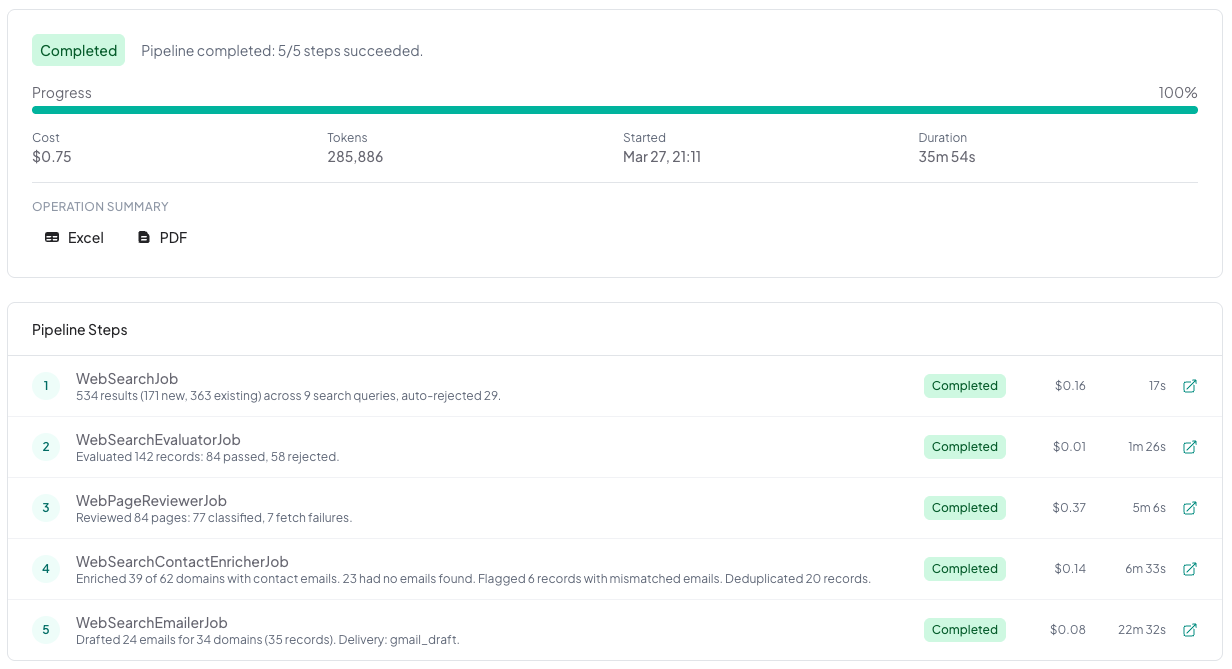
Time per qualified lead: 5 minutes to configure a new region, then approximately 35 minutes for the full pipeline to run start to finish. That pipeline can be scheduled, meaning it runs without my active involvement. Against the target of 30 minutes or less, this is effectively a pass — the setup time is minimal and the execution is unattended.
Cost per qualified lead: once the pipeline was tuned, a full production run across 9 locations cost $0.75 in search API calls and AI model usage — roughly $0.08 per location searched. The development phase cost more (I ran individual jobs nearly a hundred times while testing and refining), but that’s a one-time investment. The ongoing cost per run is what matters for the business case, and at these numbers, cost is essentially a non-factor against the $10 to $25 per lead target. The kill criterion was $100 per lead. This wasn’t even close.
That cost figure deserves context. It’s low because of deliberate architectural choices: filtering aggressively before making expensive AI calls, using lower-cost models where the task didn’t require frontier capabilities, and limiting AI to the steps where genuine judgment was needed. Jobs 1 and 2 handled most of the volume reduction before the more expensive analysis in Jobs 3 through 5.
Qualification accuracy: Six sites incorrectly rejected in the early passes, and then of the 73 qualified sites, manual review agreed with all but one. Well below the 10% rethink threshold I’d defined.
Email response rate: 4 responses from 73 emails, consistent with my manual baseline. The pipeline didn’t improve the response rate, but it wasn’t designed to. It was designed to reduce the time and cost of generating the same (or greater!) volume of outreach.
Yield: approximately 30% of the search results that entered the pipeline turned out to be in my target market. That’s a useful baseline for planning future prospecting runs.
What I’d Do Differently
I ran the individual jobs almost a hundred times during the pilot as I tested and refined queries, prompts, and filters. A few lessons stood out.
Design for repeatability. Build the pipeline so individual jobs can be rerun independently. You’ll be testing specific functionality constantly, and rerunning the entire pipeline each time wastes money, time, and produces inconsistent results because the underlying data can change between runs.
Filter early and aggressively. The multi-stage filtering approach kept AI costs negligible. Every candidate you eliminate before making an expensive model call is money saved and noise removed.
Don’t over-invest in perfection at any single stage. I spent significant time trying to improve contact enrichment before recognizing the diminishing returns. The pilot is for learning, not for polishing.
Save your data. If you’re paying to retrieve information, store it. Data gathered in early pipeline stages turned out to be valuable later, for example, providing context for email personalization that made the output noticeably better.
Choose the right LLM. Expensive models are rarely necessary for filtering and classification. I tested higher-tier models at several stages and consistently found that cheaper, faster alternatives performed just as well for these structured tasks. Save the capable models for tasks that genuinely need them, like email generation. This echoes what I covered in Post 15 about budgeting time to test different models against your specific use case.
And the biggest lesson: my initial architecture was wrong. The four-job pipeline became five jobs because the original Job 3 was trying to do too much. That’s not a failure — that’s the pilot working exactly as intended. The key is recognizing the change, evaluating whether it invalidates your assumptions, and proceeding or stopping accordingly.
What Comes Next
The pilot passed every success criterion and didn’t trigger any kill or rethink thresholds. But that doesn’t automatically mean “full speed ahead.” Next week, I’ll cover how to read pilot results honestly and make the proceed, modify, or stop decision without letting momentum or sunk costs override the evidence.
Wrap Up
This post is part of a series on the current state of AI, focused on how it can be applied in practical ways to deliver measurable improvements in productivity, cost savings, and response times. If you’d like to explore more, all previous posts are available under Insights; please read them and reach out with any questions or comments you have.